
Create awareness with Concurrent Editing – Enable smooth cross-collaboration within your team
The need for Concurrent Editing
Cross-collaboration within organizations is a must in order to be successful and complete projects as efficiently as possible. However, when multiple people concurrently edit the same experiment or variation unknowingly, it may cause constant overwriting between users, thus making teamwork inefficient and confusing. In fact, failing to collaborate efficiently can lead to misallocated time and resources, resulting in slower experimentation and missed opportunities.
Efficient cross-collaboration can be particularly complex for:
- High-activity companies with numerous collaborators wanting to work on the same experiment at the same time
- Low-activity companies which haven’t yet established adequate internal communications
For example, experiment collaborators might work on an experiment for several hours only to see their changes being overwritten by someone else’s edits. This is a pain that has been known to be frustrating to users. Therefore, Optimizely is committed to making sure that our Web Experimentation product allows multiple experiment collaborators to edit an experiment simultaneously by informing active users what others are working on in real time. By collaborating live together, users will save time and have more visibility on others’ contributions.
Experiment Collaborators Need To Know What’s Going On At All Times: Introducing Concurrent Editing Awareness
To solve this, Optimizely’s teams came up with a feature that will display a banner notification to inform active users of other active users who are viewing/editing the same project.
The way that an experiment collaborator will see it within Optimizely:
- View when “More info” is clicked on the experiment details screen
- Get warning message about potential overwriting
- See who is viewing/editing the page and their respective email address
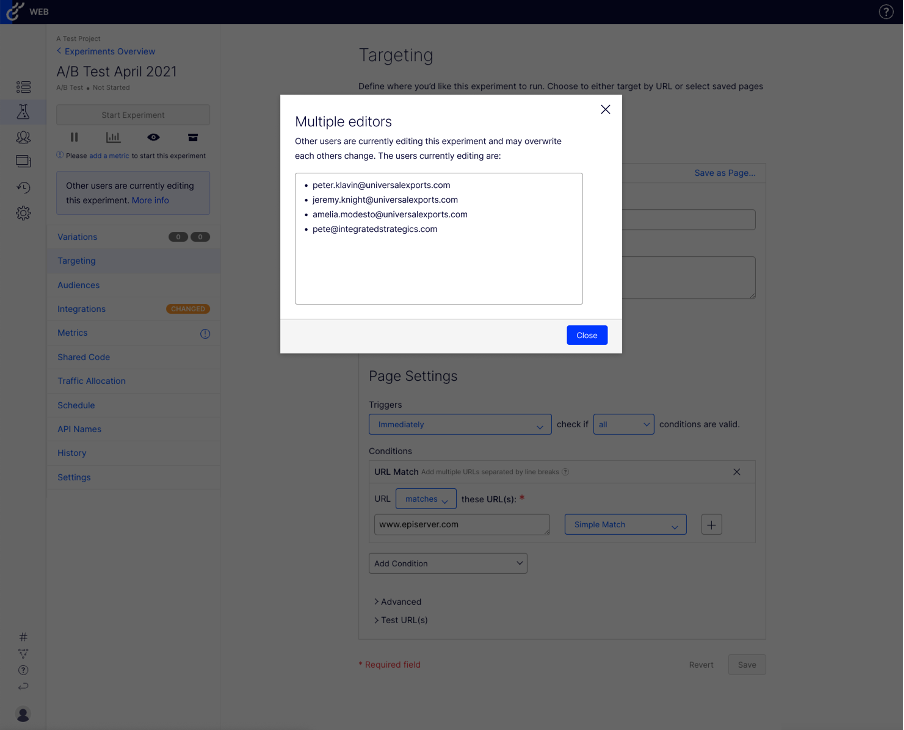
The warning banner can be dismissed by clicking “Close”; however, it may reappear in 2 instances: (1) when a new user starts editing the same experiment mid-session and (2) when a session ends and restarts (every new session/page refresh).
Conclusion
With Concurrent Editing, the management of experimentation assets will be significantly easier. Experiment collaborators will be able to identify which pages are being concurrently edited to avoid overwriting and confusion. Concurrent editing will make cross-collaboration between users smoother by increasing experiment velocity and performance.
Questions?
Please contact support@optimizely.com if you need assistance with our Web Experimentation product. If you’d like to follow our development updates, feel free to subscribe to our RSS feed by clicking the corresponding icon below.

Comments