
Changing Display Options Programmatically
Hello World.
Display Options are a great way for you to give your content editors the ability to change how blocks and other content are displayed when working with ContentAreas.
But one thing about Display Options isn’t very intuitive - how do we as developers apply them to content programmatically? I’d like to put it out there how this can be achieved very easily.
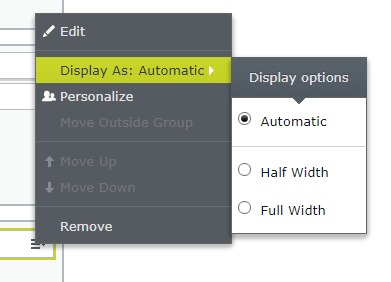
For this example I've set up two Display Options - Half Width and Full Width. But our content starts without having one of these set.
The Theoretical Stuff
One thing to remember is that the display options are not a part of the content itself. Instead it's a setting on a ContentArea that the content has beend added to. More specifically a setting available on every ContentAreaItem that populates the ContentArea.Items list.
So in other words we need to work with the piece of content that has the ContentArea we want to modify as a property. In my example below I've added a ContentArea property called "MainContent" to the QuickSilver StartPage
The Code
Knowing that Display Options are set on a ContentAreaItem, let’s look at the code!
    var startPage = _contentRepository.Get<StartPage>(ContentReference.StartPage);
    var cloneStartPage = startPage.CreateWritableClone() as StartPage;

    // Select the correct item in whatever way you want.
    // You could for example match specific content by looking for ContentArea.Items.FirstOrDefault(x => x.ContentLink == myContentReference)
    // This time I'm just grabbing the first item in the ContentArea.
    var item = cloneStartPage?.MainContent?.Items.FirstOrDefault();

    if (item != null)
    {
        item.RenderSettings["data-epi-content-display-option"] = "half-width"; // "half-width" being the Id for a DisplayOption that we've setup in our DisplayOptions
        cloneStartPage.MainContent.IsModified = true;
        _contentRepository.Save(cloneStartPage, SaveAction.Publish, AccessLevel.NoAccess);
    }
It's pretty simple but there are a couple of things here that are note worthy. First of all is the use of ContentAreaItem.RenderSettings dictionary instead of the now obsoleted ContentAreaItem.DisplayOption. It's a doozy of a dictionary key to remember, but hopefully it'll be setup as a constant somewhere some time soon. Or you can just refer back to this blog post. 
Either way, the second thing of note is that we explicitly set the ContentArea.IsModified property to true. Modifying the RenderSettings without doing any other change doesn't setup the ContentArea properly for whatever (probably performance related) magic that the ContentRepository.Save method does to determine what gets updated in the database and what doesn't.
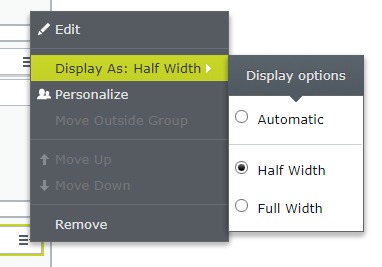
So if we ommit that line and save our page nothing will have changed after we've run our code. But adding it and then saving will properly update the display option on our piece of content:

Comments