
Import Blobs and Databases to Integration Environments
In this blog, we are going to explore some new extensions to the Deployment API in DXP Cloud Services, specifically the ability to import databases and blobs via the API. Some caveats to consider before we jump into the details,
- Blob and database imports are limited to integration and ADE environments
- Database imports are only available when using -DirectDeploy.
Uploading and Deploying Databases
You can know supply a bacpac file to Add-EpiDeploymentPackage
$saslink = Get-EpiDeploymentPackageLocation
Add-EpiDeploymentPackage -SasUrl $saslink -Path “C:\MyDatabaseFiles\environmentname.cms.sqldb.20231106.bacpac”
Bacpac is the same format that is used when databases are exported along with the same naming convention, so that any database that is exported can easily be imported again.
Once the upload is done, we can simply pass it to Start-EpiDeployment
Start-EpiDeployment -DeploymentPackage (”environmentname.cms.sqldb.20231106.bacpac”,”cms.app.1.0.0.nupkg”) -TargetEnvironment “Integration” -DirectDeployThis example deploys a nupkg at the same time, but that can be ommitted to just import a database. E.g., -DeploymentPackage “environmentname.cms.sqldb.20231106.bacpac”. As usual, you will be able to see the status of the deployment in the management portal, or Get-EpiDeployment.
Creating a writeable SAS URI to upload blobs
For quite some time now, we have had the possibility to create readable SAS URIs via the Deployment API. E.g.,
Get-EpiStorageContainerSasLink -Environment “Integration” -StorageContainer “mysitemedia”You can now add a -Writable flag to this command which enables you to upload blobs to the container as well. You can use this SAS URI to write via HTTPS, or use with Azure Storage Explorer. If you are using Azure Storage Explorer, select connect to a Blob container or Directory
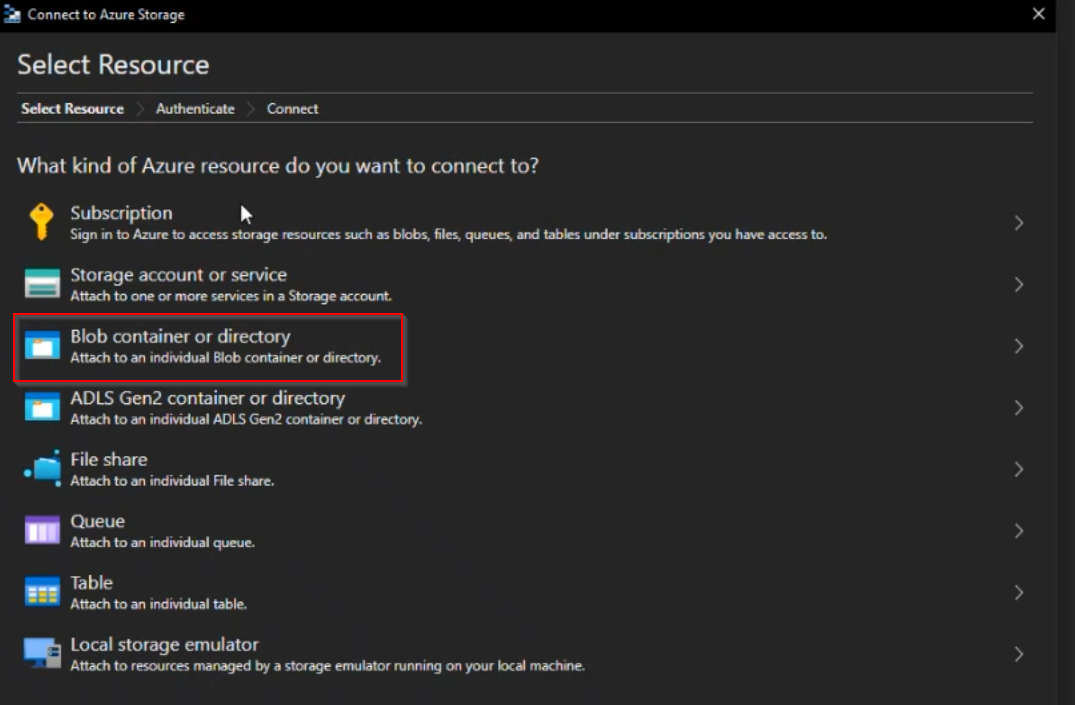
Then select Shared access signature URL (SAS), and paste the writeable SAS URL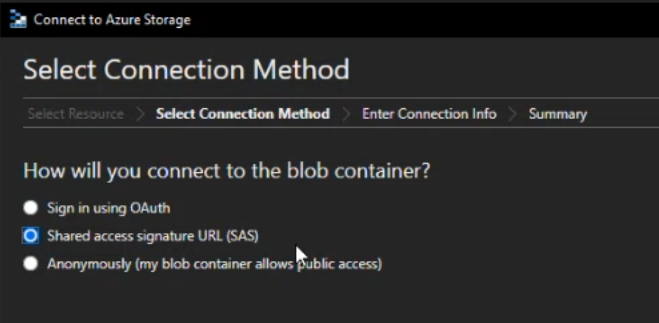
Our hope is that this will make it easier to deploy an existing site to our Cloud Services, and allow you to export content from any environment and easily import it again.

Comments