
Developer Preview: Migrations to .NET 5 on DXP Cloud Services
Major upgrades can be daunting and carry risk in many areas; data corruption, breaking integrations and can require downtime. On the other side of the coin, lagging in adopting the latest upgrades carries the risk of poor security posture, obsolescence, incompatibilities and potential software rot. Due to this, we set ourselves a goal when we planned the release of Content Cloud 12 and Commerce Cloud 14 customers that are running in our DXP Cloud Services – make the transition as smooth as possible and minimize risk with the upgrade. This blogpost will give you an insight into our thought process behind our new development and give you a preview of what’s to come.
The first step of this is upgrading the software itself. For this, we created the .NET Upgrade Assistant extension specific to Optimizely scenarios that allows users to go through a guided experience to reduce time and difficulty in the task of modernizing codebases. But how do you actually go about deploying this to production in a manner that carries the least risk?
To tackle this in our DXP Cloud Services, we have been working on a similar guided experience to let existing Content Cloud 11 and Commerce Cloud 13 users deploy sites in parallel to existing environments.
Starting a migration
In the DXP Management Portal, you’ll be greeted with a new tab called Project Migration. This will act as your main hub for administrating the migration process.
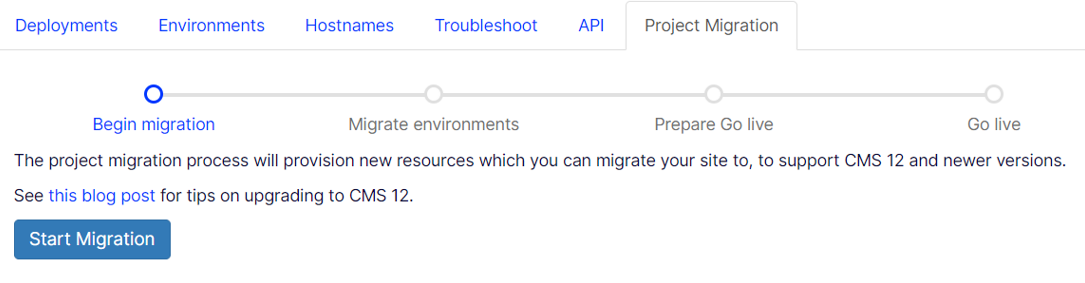
Kicking of the migration will provision a parallel project that is completely decoupled from your current environments – complete with integration, preproduction and production environments (including Search & Navigation indexes). This allows you to start deploying your new Content Cloud 12 and Commerce Cloud 14 solutions without affecting status quo.
Migrating environments
Once your new project has been provisioned, you will be able to start deploying to it using the DXP Management portal UI or the deployment API. During any development process, it’s also convenient to access production data to test with “real” data and make sure everything works as expected. Navigating back to the source project in the DXP Management Portal will allow you to copy content from any environment in the source project to any environment in the target project on demand.
Going live
Once you are satisfied that the sites work as expected running on the newest version of Content and Commerce Cloud, it’s time for the moment of truth – going live. In this move, there’s a balance to be struck between incurring downtime and managing data consistency. We want to keep the source site(s) available as long as possible, but at the same time make sure we haven’t left any data behind. As such, kicking off the go live process will do a couple of things,
- Put the source site(s) in maintenance mode to make sure no more data is written to Azure resource local to those site(s)
- Start a final data transfer over to the target environment
- Switch the origin in the Content Delivery Network (CDN) to the new environment for all hostnames coupled with the source environment
And that’s it – your sites should be running on .NET 5 at this point.
We’re still working hard to finish this tooling to allow seamless transitions to our latest software but wanted to put together this preview to convey our thought process and plans. If you have any feedback, we’re happy to receive it through our feedback portal. Contact your Customer Success Manager if you are eager to get started as we are currently running an Early Adopters program for this feature.
FAQ
I have multiple sites and wish to upgrade them one at a time, is that possible?
We are working on how to support this scenario.
Are there any DNS changes involved with this transition?
You may be asked to create some TXT records to validate the domain for the new DXP project, but the final go live event is handled through the CDN.
Is there any risk with starting a migration?
None at all – the source environments are not affected by this until the go live phase, and it is possible to abort a migration at any point.
Is a similar migration required in the future for .NET 6?
No, the new project will support both .NET 5 and 6. We also have mechanisms to detect the targeted .NET version based on the deployed source package to select appropriate version.

Comments