


 Certification.png "SaaS CMS Administrator (Expert) Certification")


A day in the life of an Optimizely OMVP - Creating a Cloudflare Turnstile Form Element Block
Hello and welcome to another installment of a day in the life of an Optimizely developer. Today I am going to show how to create a Cloudflare Turnstile form element block for use within Optimizely Forms.
Cloudflare Turnstile is an alternative to traditional CAPTCHA systems, providing a user-friendly way to prevent spam and abuse on your website. Integrating Turnstile into Optimizely CMS allows you to enhance form security without compromising user experience.
Prerequisites
- Cloudflare Account: Ensure you have a Cloudflare account and have registered your site to obtain the sitekey and secret key - https://developers.cloudflare.com/turnstile/get-started/
- Optimizely CMS Setup: Make sure your Optimizely CMS environment is set up and ready for development.
The first task is to create a new Element Block, ensuring that you inherit from ValidatableElementBlockBase, this allows you register a validator against the element.
Turnstile Element Block
///
/// Represents a Turnstile element block for form UI. It provides extra resources, specifically a script for Cloudflare
/// Turnstile.
///
[ContentType(
    GUID = "{E426413A-1B5D-4353-B715-871F09D556C3}",
    DisplayName = "Turnstile",
    GroupName = ConstantsFormsUI.FormElementGroup,
    Order = 2230)]
[ImageUrl("~/img/cloudflare-turnstile-logo.png")]
public class TurnstileElementBlock : ValidatableElementBlockBase, IExcludeInSubmission, IViewModeInvisibleElement, IElementRequireClientResources
{
    private static readonly ILogger _logger = LogManager.GetLogger(typeof(RecaptchaElementBlock));
    private Injected _config;

    [Display(GroupName = SystemTabNames.Content, Order = -5000)]
    [ScaffoldColumn(false)]
    public override string Validators
    {
        get
        {
            var turnstileValidator = typeof(TurnstileValidator).FullName;
            var validators = this.GetPropertyValue(content => content.Validators);
            return string.IsNullOrWhiteSpace(validators) ? turnstileValidator : string.Concat(validators, "|||", turnstileValidator);
        }
        set
        {
            this.SetPropertyValue(content => content.Validators, value);
        }
    }

    public override object GetSubmittedValue()
    {
        var httpContext = ServiceLocator.Current.GetInstance();
        return httpContext.HttpContext.Request.Method == "POST" ? httpContext.HttpContext.Request.Form["turnstile-response"] : httpContext.HttpContext.Request.Query["turnstile-response"];
    }

    [Ignore]
    public override string Label
    {
        get => base.Label;
        set => base.Label = value;
    }

    [Ignore]
    public override string Description
    {
        get => base.Description;
        set => base.Description = value;
    }

    ///
    /// The site key for the Turnstile element.
    ///
    [Display(GroupName = SystemTabNames.Content, Order = -3500)]
    public virtual string SiteKey
    {
        get
        {
            var siteKey = this.GetPropertyValue(content => content.SiteKey);
            if (string.IsNullOrWhiteSpace(siteKey))
            {
                try
                {
                    siteKey = _config.Service.TurnstileKey?.SiteKey;
                }
                catch (ConfigurationErrorsException ex)
                {
                    _logger.Warning("Cannot get TurnstileSiteKey from app settings.", ex);
                }
            }
            return siteKey;
        }
        set
        {
            this.SetPropertyValue(content => content.SiteKey, value);
        }
    }

    ///
    /// The shared key between the site and Turnstile.
    ///
    [Display(GroupName = SystemTabNames.Content, Order = -3400)]
    public virtual string SecretKey
    {
        get
        {
            var secretKey = this.GetPropertyValue(content => content.SecretKey);
            if (string.IsNullOrWhiteSpace(secretKey))
            {
                try
                {
                    secretKey = _config.Service.TurnstileKey?.SecretKey;
                }
                catch (ConfigurationErrorsException ex)
                {
                    _logger.Warning("Cannot get TurnstileSecretKey from app settings.", ex);
                }
            }
            return secretKey;
        }
        set
        {
            this.SetPropertyValue(content => content.SecretKey, value);
        }
    }

    public IEnumerable> GetExtraResources()
    {
        return new List>() {
                new("script", "https://challenges.cloudflare.com/turnstile/v0/api.js")
            };
    }
}
The next step is to create a validator class that needs to inherit from InternalElementValidatorBase, it is this validator that takes the token generated by the Turnstile element, and performs the call to the Turnstile siteverify endpoint, this is a crucial step as without it you can not confirm if the generated token has successfully verified the site.
Turnstile Validator
public class TurnstileValidator : InternalElementValidatorBase
{
    private const string TurnstileVerifyBaseUrl = "https://challenges.cloudflare.com";

    public override bool? Validate(IElementValidatable targetElement)
    {
        var submittedValue = targetElement.GetSubmittedValue().ToString();
        if (string.IsNullOrWhiteSpace(submittedValue))
        {
            return false;
        }

        var turnstileElement = targetElement as TurnstileElementBlock;
        if (turnstileElement == null)
        {
            return false;
        }

        var client = new HttpClient();

        var formData = new Dictionary
            {
                { "secret", "<your secret key>" },
                { "response", submittedValue }
            };

        var content = new FormUrlEncodedContent(formData);
        var postTask = client.PostAsync($"{TurnstileVerifyBaseUrl}/turnstile/v0/siteverify", content).Result;

        var result = postTask.Content.ReadAsStringAsync().Result;
        var resultObject = JsonSerializer.Deserialize(result);

        return resultObject.GetProperty("success").GetBoolean();
    }
}
The following class allows the Site key and Secret key to be retrieved from config, and is injected into the TurnstileElementBlock whereby the associated Site Key and Secret Key properties are set to the values stored in config.
Turnstile API Key Options
[Options(ConfigurationSection = "Turnstile")]
public class TurnstileApiKeyOptions
{
    public TurnstileKey? TurnstileKey { get; set; }
}

public class TurnstileKey
{
    public string? SiteKey { get; set; }

    public string? SecretKey { get; set; }
}
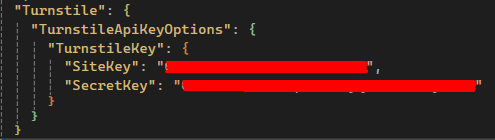
The following configuration needs to be added to your appsettings.json file which specifies your Turnstile site key and secret key.
Appsettings Configuration
Finally you need to create a new CSHTML file within the "Views/Shared/ElementBlocks" folder naming the file the same name as your element block (in the above case it would be named 'TurnstileElementBlock.cshtml')
You will notice that the file contains a div which is where the Turnstile component gets injected to, this also has a sitekey data attribute which needs to be set to the site key specified in the block, there is also a callback data attribute in this case named 'javascriptCallback' which calls a Javascript function passing in the token, the function then sets the value of a hidden field to the token passed back.
CSHTML File

Once all of the above has been implemented, when you add the new element block to an Optimizely form, you will see the Turnstile element block appears within the form.
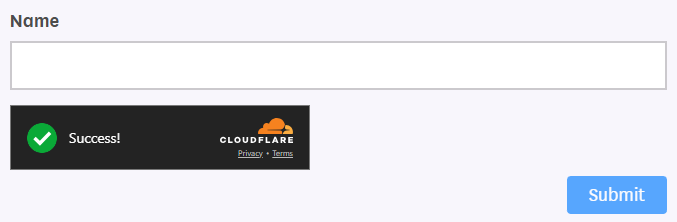
On submission of the form, the validator method will be called and the generated token verified, if the token is verified then the form submits successfully, if not verified then form submission will be unsuccessful.

Comments