
A critical vulnerability was discovered in React Server Components (Next.js). Our systems remain protected but we advise to update packages to newest version. Learn More


Feb 8, 2011
  1883
(0 votes)

Common properties amongst the pages

Instead of using a lot of dynamic properties one can create a special settings page. On this page all site-wide settings are saved all together. Then you make only the name of this page to be a dynamic property (ref. to http://www.meadow.se/wordpress/?cat=12). This is a common solution. However, code in the code-behind files becomes a little more complicated if you want to retrieve the settings from the settings page.

For example:

PropertyCriteriaCollection

        propertyCriteriaCollection = new PropertyCriteriaCollection();

PropertyCriteria criteria = new PropertyCriteria();

criteria.Condition = CompareCondition.Equal;

criteria.Name = "PageTypeID";

criteria.Type = PropertyDataType.PageType;

criteria.Value = PageType.Load("SettingsPage").ID.ToString();

criteria.Required = true;

propertyCriteriaCollection.Add(criteria);

PageDataCollection pageDataCollection

                = DataFactory.Instance.FindPagesWithCriteria

                    (PageReference.RootPage, propertyCriteriaCollection);

if (pageDataCollection == null || pageDataCollection.Count == 0)

                return;


if (pageDataCollection[0]["SomeProperty"] != null)

                TextBox1.Text =

                       pageDataCollection[0] ["SomeProperty"].ToString();


You see how many actions should be performed with a single aim – to get the SettingsPage’s SomeProperty value. Evidently it’s tiresome and error prone.

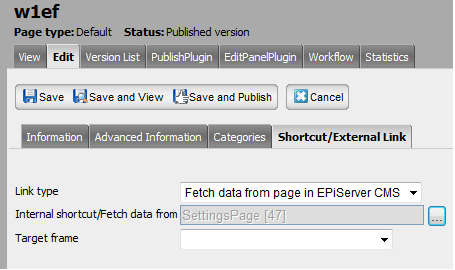
Instead you can force the page to load properties values from some other page. For this just open the Shortcut/External Link tab in edit mode, assign  “Fetch data from page in EPiServer CMS” to Link type , and choose the page the properties are loaded from (f.e. SettingsPage):
image

From this time you can apply to SettingsPage as if they belonged to the w1ef page:

string someProperty = CurrentPage["SomeProperty"] as string;

or:

<EPiServer:Property PropertyName="SomeProperty" runat="server" />

Feb 08, 2011

Comments

Please login to comment.
Latest blogs
A day in the life of an Optimizely OMVP: Learning Optimizely Just Got Easier: Introducing the Optimizely Learning Centre

On the back of my last post about the Opti Graph Learning Centre, I am now happy to announce a revamped interactive learning platform that makes...

Graham Carr | Jan 31, 2026

Scheduled job for deleting content types and all related content

In my previous blog post which was about getting an overview of your sites content https://world.optimizely.com/blogs/Per-Nergard/Dates/2026/1/sche...

Per Nergård (MVP) | Jan 30, 2026

Working With Applications in Optimizely CMS 13

💡 Note:  The following content has been written based on Optimizely CMS 13 Preview 2 and may not accurately reflect the final release version. As...

Mark Stott | Jan 30, 2026

Experimentation at Speed Using Optimizely Opal and Web Experimentation

If you are working in experimentation, you will know that speed matters. The quicker you can go from idea to implementation, the faster you can...

Minesh Shah (Netcel) | Jan 30, 2026