

Scheduled jobs setup in DXC Service
Scheduled jobs is one of the essential features of Episerver platform. The main purpose of scheduled jobs is to execute in background repeatable long-running tasks within Episerver context, but outside of a web request. You can find more information about this feature here.
A long-running and resource-intensive scheduled job might negatively affect application performance when it runs on the same web server that also serves site visitors requests. There is a known solution for this - when the application is hosted on multiple web servers one of the web servers is dedicated to scheduled jobs by applying a configuration change (see Multi-sever scenario in the scheduled jobs documentation) and exclude the server from the load balancers list. This setup works fine for the hosting scenarios when the site administrator has full access to the web servers. However, in case of multi-tenant hosting solution like Azure App Service, there is no way to control configuration for individual web server instances. Here is how we solve this in DXC Service.
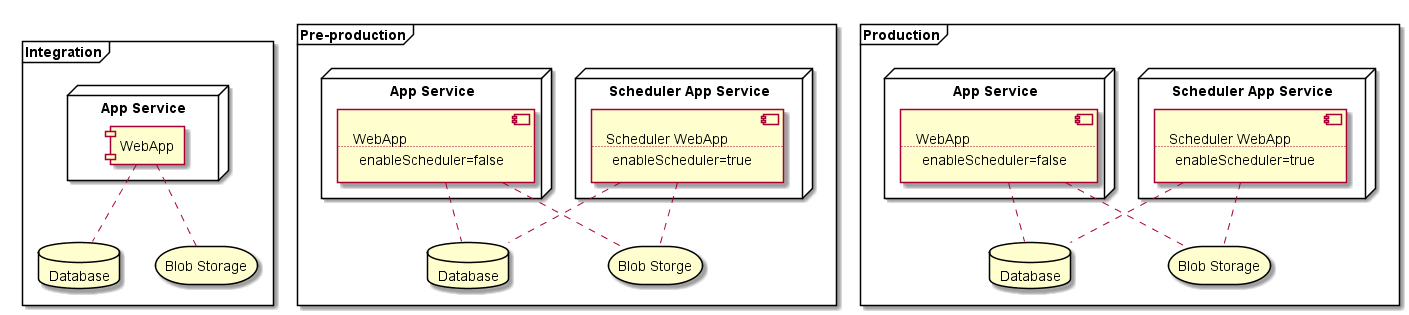
Since each web server instance in Azure App Service has identical application codebase and configuration, there is no way to configure the enableScheduler attribute for a particular instance. Instead, we configure enableScheduler=”false” for the whole WebApp that serves site visitor requests, and create a separate WebApp dedicated to scheduled jobs, that has the same codebase and configuration as the primary one, except enableScheduler is set to ”true.” To avoid any performance impact on the primary WebApp, the scheduled jobs WebApp is hosted on a separate App Service. Each App Service in Azure is essentially a set of web workers that can host one or multiple web applications (more in-depth information about this topic is available here). By using a separate App Service, we can ensure that scheduled jobs will run on dedicated web workers. The scheduled jobs WebApp and App Service is provisioned as needed in DXC Service and updated automatically by DXC deployment flow together with the primary WebApp, so this process is completely transparent for DXC customers and doesn’t require any code changes or configuration updates. The DXC deployment flow will also configure the enableScheduler attribute automatically. Note that dedicated scheduled jobs WebApp and App Service are created only on Pre-production and Production environments, but not on Integration.
When developing a scheduled job for a site hosted in DXC-S, it is important to define the job as stoppable - set the IsStoppable property to true and implement the Stop method. This will give a chance for your job to perform a graceful shutdown when the web worker instance is recycled during jobs execution. Another important consideration, especially for the long-running jobs and jobs processing massive amounts of data, is to configure the job as Restartable. This will tell the scheduler service to start the job again if the job was shut down during the previous execution. It’s up to the jobs implementation to store some checkpoint to be able to resume the processing when restarted.

Comments