

Extending Commerce campaign facets
It's fair to say Commerce sites are imcomplete without sales campaigns and promotions. Episerver Commerce fully supports that and even better, it allows you to handle (fairly *) big number of campaigns and promotions with ease. One of the most highly anticipated features that was added to Commerce last year was the Campaign facet groups, which allows you to filter campaigns and promotions without breaking a sweat:
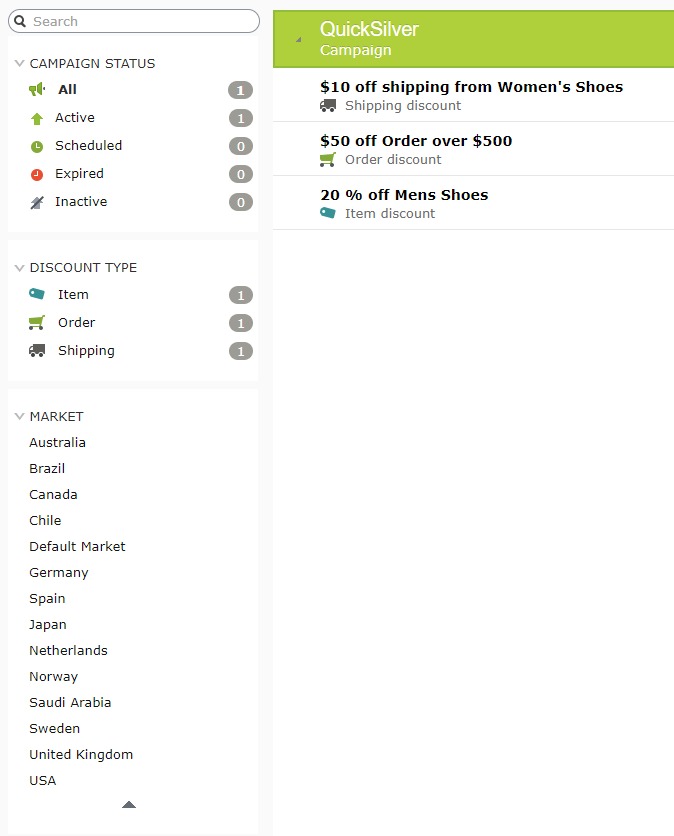
This is great because it allows you to quickly navigate/filter by campaign statuses, promotion types and markets. However, can it be even greater?
What if you have one type of promotion so you don't bother showing other types? Or if you have 4 markets, and everytime you want to filter by the forth market, you would have to click on the expand button on the market filter, so you can select it. Or if you have more filters, based on the targeting visitor groups of the campaigns?
Until now, it is possible, but with a ceveat. You have to do things that you should not have to (and probably don't want to) to get it done.
Worry no more, with the upcoming Commerce 12.10, it is, hopefully, much easier.
Commerce 12.10 introduces FacetGroupModifier, which can be overriden to change the builtin facet groups, or to add new facet groups. Let's go back to previous example: let's make the market facet group show 4 markets all the time:
 public class CustomFacetGroupModifier : FacetGroupModifier
    {
        public override IEnumerable<FacetGroup> ModifyFacetGroups(IEnumerable<FacetGroup> facetGroups)
        {
            var marketFacetGroup = facetGroups.FirstOrDefault(f => f.Id == CampaignFacetConstants.MarketGroupId);
            if (marketFacetGroup != null)
            {
                marketFacetGroup.Settings.ItemsToShow = 4;
            }
            return facetGroups;
        }
    }
So FacetGroupModifier has only one method that take a list of FacetGroup and returns one. Here you can decide what to do with the builtin facet groups (which is passed to you), by changing their settings, remove one or more, or decide to add your own. And then you just need to register your implementation in one of your IConfigurableModule
 public void ConfigureContainer(ServiceConfigurationContext context)
        {
            var services = context.Services;
services.AddSingleton<FacetGroupModifier, CustomFacetGroupModifier>();
        }
And that's it, my friends :)
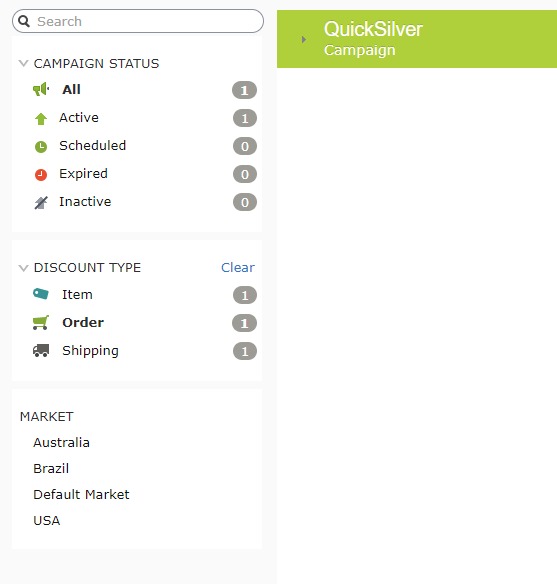
Commerce 12.10 is being baked (read, being tested by our QAs) and will be released in one week or so.
*: By Fairly, I meant thousands. Anything more than a dozen thousands is on the edge of the UI.

Comments