


Use a page type as a scheduledjob
Scheduledjobs have evolved a bit over the years but they still lack a nice way to have input parameters. If you don't hard code everything I see the following alternatives.
- Appsettings
Works but can only be done by a developer with access to the server environment. Causes a restart of the website. - Properties on a page
I really like using a builtuin way to get a nice editorial experience when setting parameters. But having to view logs / status in admin mode and change settings in edit mode feels a bit disconnected. And I think that admin-mode access for non developers should be kept to an absolute minimum. - Extending the builtin views in admin mode
Mathias Kunto did a nice implemantation where you can extend the builtin views with the help of control adapters. You can read his blog post here.
So hardcoding and using appsettings is out of questions but I really like using builtin editorial features for a smooth experience but mixing edit and admin mode together makes is hard to understand. Mathias way is for sure the most "integrated" way of doing it, but is in admin mode which is still in webforms and for some jobs I would like a more granular control over who can handle specific jobs without giving access to everything in admin mode.
So here is a proof of concept of the solution I came up with: A page type that after initial publish it automatically sets it self for scheduled publishing according to the preffered interval and all work is done during the publishing event.
To get everything up and running we need a specific page type which have all the settings we want and the model will contain all code that do the actual scheduledwork and handling logging. We also need an initalizationmodule hooking up to the PublishingContent and PublishedContent events. And of course the schedulejob handling future publishing of content must be up and running.
The page type is lika any normal page type but it contains one method that will perform all work and log a status message to a IList property:
public void DoTheMagic()
{
  if (this.HistoryLog == null) this.HistoryLog = new List<Log>();

     var message = new Log
     {
       Date = DateTime.Now.ToString(),
       Message = "We did som magic!",
       ExecutedBy = "The logged in user"
      };

      this.HistoryLog.Add(message);
}
In the initaliziationmodule PublishingContent event if the content is of the correct type we call the DoTheMagic method. We need to do it in the publishing event because we are creating a log message and adds it to the logging IList property and we need to have the object in a writable state.
private void ToolPageInitializationModule1_PublishingContent(object sender, EPiServer.ContentEventArgs e)
{
    var page = e.Content as ToolPage;

    if (page != null)
    {
        page.DoTheMagic();
    }
}
To hande setting the new scheduled publish date we need to to it in the PublishedContent event. Trying to change the date in the same event as the DoTheMagic don't work.
private void ToolPageInitializationModule1_PublishedContent(object sender, ContentEventArgs e)
{
    var page = e.Content as ToolPage;
    var writable = page.CreateWritableClone() as ToolPage;

    if (page != null)
    {
        if (page.Interval == "Minute")
        {
            var date = writable.StartTime = page.StartTime.AddMinutes(page.IntervalValue);
            writable.StartPublish = date;

            ServiceLocator.Current.GetInstance<IContentRepository>().Save(writable, SaveAction.CheckIn | SaveAction.Schedule, EPiServer.Security.AccessLevel.NoAccess);
        }

    }
}
So in the editorial interface it looks like this:
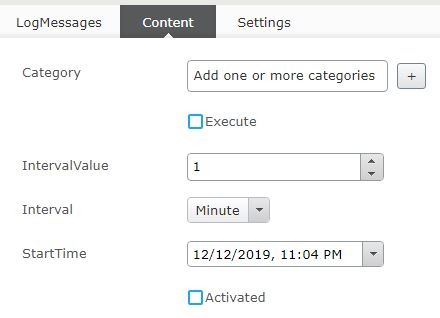
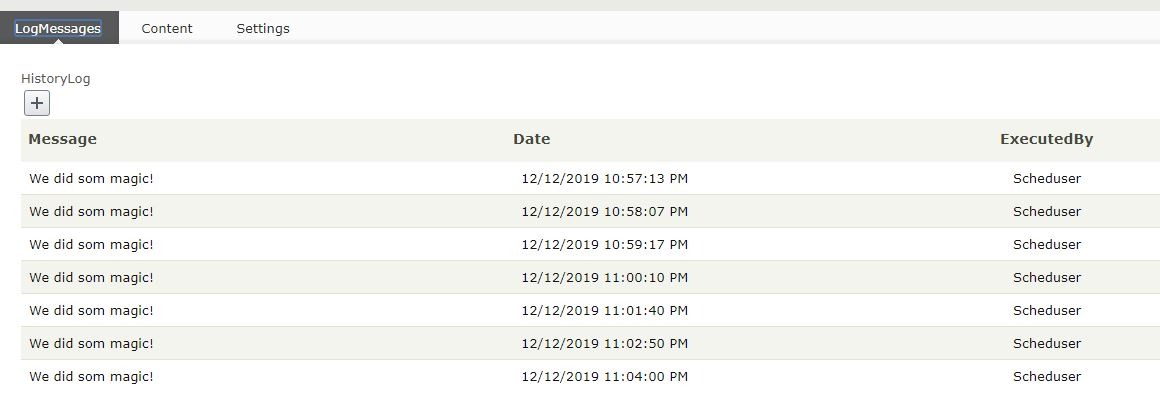
So this is only a simple proof of concept but it does what I set up to do so at this stage Im happy :)

Comments