
A critical vulnerability was discovered in React Server Components (Next.js). Our systems remain protected but we advise to update packages to newest version. Learn More

Per Nergård (MVP)
Feb 2, 2016
  2074
(0 votes)

Order tabs with drag and drop

To get that smoth editorial experience in edit mode a correct ordering of the tabs play an important part.

In most projects I tend to do a last minute check and change ordering and access rights. Unfortunately the Edit Tabs view in admin mode is a pain to use since you need to click edit on each row in order to change index number and access rights. 

As a remedy Episerver has given us the [GroupDefintion] attribute which lets us declare tabs and set access rights from code. Be aware that when using the [GroupDefinition] attribute all editing of tabs in admin mode is locked down, forcing you to do a code change, recompile ,deploy just to do a small tab change. Not good in my opinion.

So what to do.. Drag and drop tab ordering plugin to the rescue.

It's a simple admin mode plugin that lets you drag and drop order of tabs and change accesslevels without needing to click edit first. Just order the tabs and change access rights and hit save and youre done. 

You can change sort order of tabs defined by code but for some reason you cant change access rights. I always start the sortindex value counter at 100 and use a step of 100. For some reasons the numbers on tabs defined in code doesn't show the correct number but the new values are there.

To handle the drag and drop support I have used the excellent and very simple to use Dragula.js.

You can get the code over at my Gist
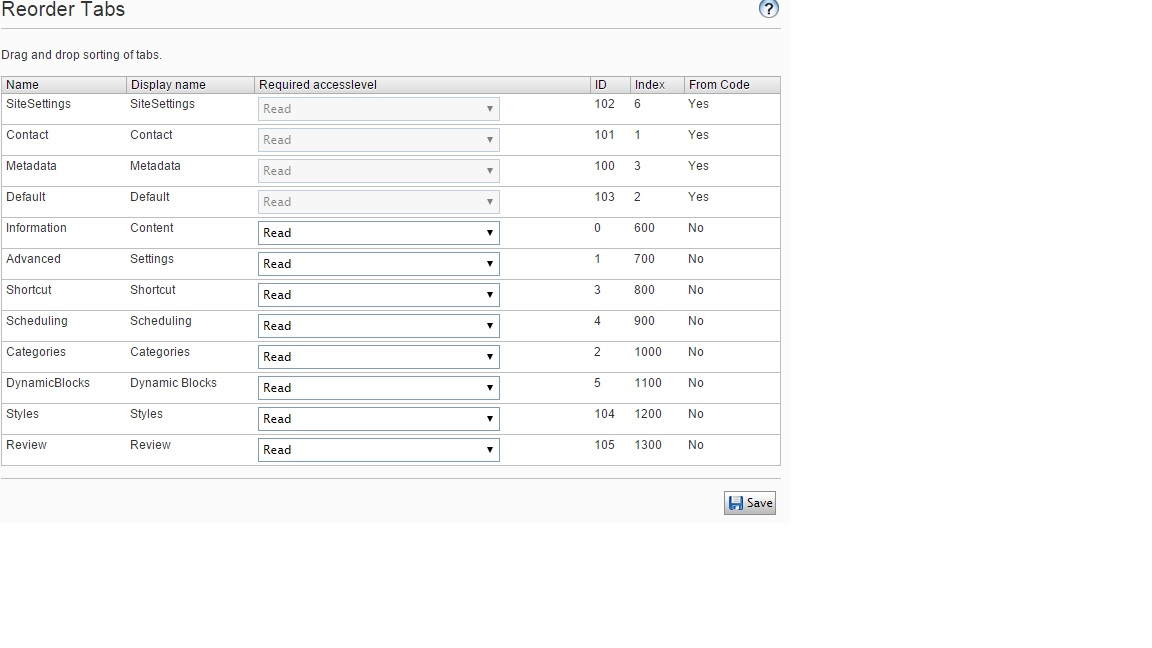
Image tabrreorder.png

Feb 02, 2016

Comments

Please login to comment.
Latest blogs
A day in the life of an Optimizely OMVP: Learning Optimizely Just Got Easier: Introducing the Optimizely Learning Centre

On the back of my last post about the Opti Graph Learning Centre, I am now happy to announce a revamped interactive learning platform that makes...

Graham Carr | Jan 31, 2026

Scheduled job for deleting content types and all related content

In my previous blog post which was about getting an overview of your sites content https://world.optimizely.com/blogs/Per-Nergard/Dates/2026/1/sche...

Per Nergård (MVP) | Jan 30, 2026

Working With Applications in Optimizely CMS 13

💡 Note:  The following content has been written based on Optimizely CMS 13 Preview 2 and may not accurately reflect the final release version. As...

Mark Stott | Jan 30, 2026

Experimentation at Speed Using Optimizely Opal and Web Experimentation

If you are working in experimentation, you will know that speed matters. The quicker you can go from idea to implementation, the faster you can...

Minesh Shah (Netcel) | Jan 30, 2026

How to run Optimizely CMS on VS Code Dev Containers

VS Code Dev Containers is an extension that allows you to use a Docker container as a full-featured development environment. Instead of installing...

Daniel Halse | Jan 30, 2026

A day in the life of an Optimizely OMVP: Introducing Optimizely Graph Learning Centre Beta: Master GraphQL for Content Delivery

GraphQL is transforming how developers query and deliver content from Optimizely CMS. But let's be honest—there's a learning curve. Between...

Graham Carr | Jan 30, 2026