
Providing a custom view for your Visitor Group criteria
In this blog post, Magnus Paulsson shows us a nice example of creating a criterion for the EPiServer Visitor Group framework and making the UI richer with the use of DoJo and MVC controllers. In this post I would like to show you how you can provide your own custom view for a criterion to plug-in to the Visitor Group Admin.
The Visitor Group Admin user interface is MVC 2.0 based and therefore uses convention over configuration. What that means is that you don’t use web.config or code based attributes to register a Visitor Group Admin criterion view like you would for other types of EPiServer CMS view plug-ins. Where the view is placed in the site’s structure and what it is called are the conventions that make it work.
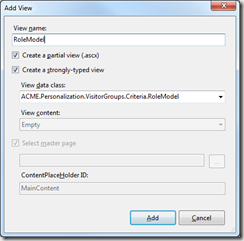
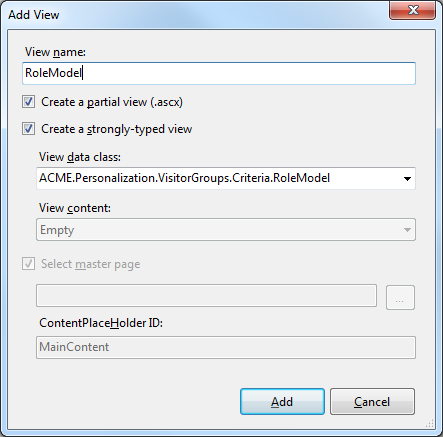
So for example, to provide a custom view for Magnus’ example, you would create a typed MVC Partial View, the View Data class is the Visitor Group model, in this case:
ACME.Personalization.VisitorGroups.Criteria.RoleModel
The view should be given the same name as the model:
RoleModel.ascx
and it should be placed in the following folder structure in the site:
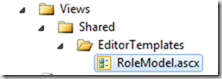
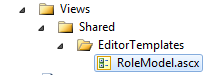
Now when an instance of the criterion is added to a Visitor Group in Visitor Group Admin, the custom view will be shown instead of the default one.
Of course you may use any HTML you like in your custom view but the EPiServer Visitor Group framework adds some extension methods to the System.Web.Mvc.HtmlHelper instance that can be used. The extension methods help you render the edit control html for your model’s properties leaving you free to concentrate more on the overall layout.
In Magnus’ example his model has 2 properties:
SelectionFactoryType = typeof(EnumSelectionFactory),
LabelTranslationKey = "/shell/cms/visitorgroups/criteria/role/comparecondition",
AdditionalOptions = "{ selectOnClick: true }"),
Required]
public RoleCompareCondition Condition { get; set; }
[DojoWidget(
LabelTranslationKey = "/shell/cms/visitorgroups/criteria/role/rolename",
AdditionalOptions = "{ selectOnClick: true }"),
Required]
public string RoleName { get; set; }
The Condition property is decorated with the DojoWidget attribute and the SelectionFactoryType property is set. In this case the EPiServer Visitor Group framework will render a dijit.form.FilteringSelect control by default. In your custom view you can render the default edit control for the property by calling one of the DojoEditorFor extension methods provided:
There are 5 overloads of the DojoEditorFor method available:
/// Creates Dojo editor.
/// </summary>
/// <typeparam name="TModel">The type of the model.</typeparam>
/// <param name="html">The HTML helper.</param>
/// <param name="p">The property.</param>
/// <param name="htmlAttributes">Additional html attributes</param>
/// <param name="label">The label text.</param>
/// <param name="labelCssClass">Css class for the label</param>
/// <param name="labelPosition">The position of the label relative to the editor control</param>
/// <returns>The rendered HTML markup</returns>
public static MvcHtmlString DojoEditorFor<TModel>(this HtmlHelper<TModel> html, PropertyInfo propertyInfo, object htmlAttributes, string label, string labelCssClass, LabelPosition labelPosition)
/// <summary>
/// Creates Dojo editor.
/// </summary>
/// <typeparam name="TModel">The type of the model.</typeparam>
/// <typeparam name="TValue">The type of the value.</typeparam>
/// <param name="html">The HTML helper.</param>
/// <param name="expression">The property expression.</param>
/// <param name="htmlAttributes">Additional html attributes</param>
/// <param name="label">The label text.</param>
/// <param name="labelCssClass">Css class for the label</param>
/// <param name="labelPosition">The position of the label relative to the editor control</param>
/// <returns>The rendered HTML markup</returns>
public static MvcHtmlString DojoEditorFor<TModel, TValue>(this HtmlHelper<TModel> html, Expression<Func<TModel, TValue>> expression, object htmlAttributes, string label, string labelCssClass, LabelPosition labelPosition)
/// <summary>
/// Creates Dojo editor.
/// </summary>
/// <typeparam name="TModel">The type of the model.</typeparam>
/// <typeparam name="TValue">The type of the value.</typeparam>
/// <param name="html">The HTML helper.</param>
/// <param name="expression">The property expression.</param>
/// <param name="htmlAttributes">Additional html attributes</param>
/// <param name="label">The label text.</param>
/// <param name="labelCssClass">Css class for the label</param>
/// <returns>The rendered HTML markup</returns>
public static MvcHtmlString DojoEditorFor<TModel, TValue>(this HtmlHelper<TModel> html, Expression<Func<TModel, TValue>> expression, object htmlAttributes, string label, string labelCssClass)
/// <summary>
/// Creates Dojo editor.
/// </summary>
/// <typeparam name="TModel">The type of the model.</typeparam>
/// <typeparam name="TValue">The type of the value.</typeparam>
/// <param name="html">The HTML helper.</param>
/// <param name="expression">The property expression.</param>
/// <param name="htmlAttributes">Additional html attributes</param>
/// <returns>The rendered HTML markup</returns>
public static MvcHtmlString DojoEditorFor<TModel, TValue>(this HtmlHelper<TModel> html, Expression<Func<TModel, TValue>> expression, object htmlAttributes)
/// <summary>
/// Creates Dojo editor.
/// </summary>
/// <typeparam name="TModel">The type of the model.</typeparam>
/// <typeparam name="TValue">The type of the value.</typeparam>
/// <param name="html">The HTML helper.</param>
/// <param name="expression">The property expression.</param>
/// <returns>The rendered HTML markup</returns>
public static MvcHtmlString DojoEditorFor<TModel, TValue>(this HtmlHelper<TModel> html, Expression<Func<TModel, TValue>> expression)
The custom view for Magnus’ Visitor Group criterion model could look something like this:
<%@ Import Namespace="EPiServer.Personalization.VisitorGroups" %>
<div class="somefancyclassthatmakesthislookreallycool">
<div>
<%= Html.DojoEditorFor(model => model.Condition)%>
</div>
<div>
<%= Html.DojoEditorFor(model => model.RoleName)%>
</div>
</div>
Of course you don’t need to use the DojoEditorFor methods. You can ride roughshod over the model’s user interface demands and render the edit user interface however you like. However, there is a big chance of problems here as the edit controls you use must be compatible with the dijit controls the Visitor Group framework is expecting for the property. For example, given a model class like this:
{
public string SomeStringValue { get; set; }
public int SomeIntValue { get; set; }
public bool SomeBoolValue { get; set; }
public override ICriterionModel Copy()
{
return base.ShallowCopy();
}
}
you could define your view using your own HTML for the edit controls as follows;
<div>
<div>
<input type="text" id="SomeStringValue" />
</div>
<div>
<input type="text" id="SomeIntValue" />
</div>
<div>
<input type="text" id="SomeBoolValue" />
</div>
</div>
and it works quite happily:
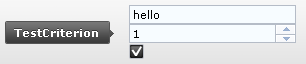
However, as you can see the dijit styles used by the Visitor Group framework have been applied to the controls and they no longer look like plain <input> controls any more. So the point here is to use the DojoEditorFor extension methods where possible to render the edit controls and if some reason you don’t want to then expect to get into some javascript to fight against what the Visitor Group framework does.
By using a combination of custom views and the Dojo Javascript Framework you can really personalize the Visitor Group Admin user inteface.
Happy customizing!

Comments