
Online Center / Admin Plugin for EPiServer Events System (Load Balancing)
From EPiServer CMS 5 we introduced a new system for load balancing called the EPiServer Events System. See here for more information.
The system uses Windows Communication Foundation (WCF) under the covers to communicate “events” between servers running EPiServer CMS, both in a standard and enterprise load balanced site. One of the most common events sent by the system is when a CMS page is updated and the PageData object in the Http cache should be removed.
It can sometimes be quite difficult to see if the Events System is working, pages get changed on an edit server but other servers in the cluster still show the old version of the page for example. With that in mind (and tens of support cases dealt with), I decided enough was enough, something had to be done to give some visual indication to the site admin that the EPiServer Events System is working, or if not, why not.
EPiServer Events Monitor Gadget
The gadget has 3 views:
System Status
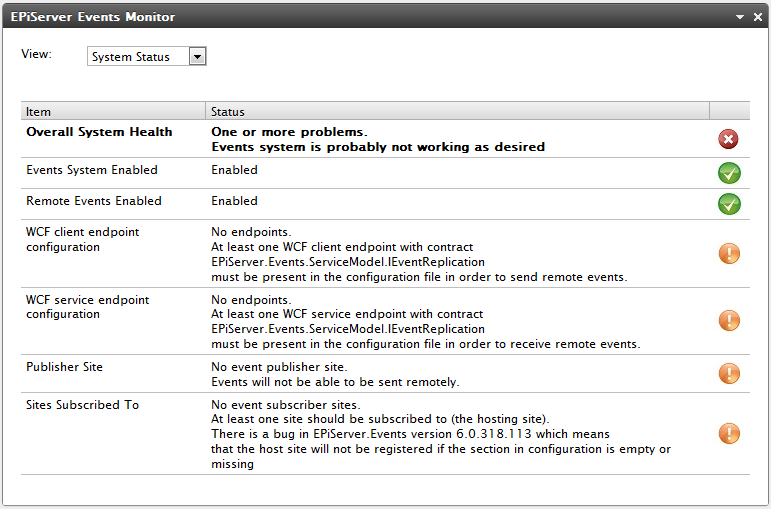
As you see the system health does not look too good for this site. This is the default state of the EPiServer Events System for a newly installed CMS 6 site. You can see that the required WCF Client and Service Endpoints are missing. The other 2 errors are also caused by the endpoints being missing. To fix the problem we just need to uncomment the client and service endpoints for the EPiServer.Events.ServiceModel.IEventReplication contract that should be present in the web.config system.serviceModel element but currently commented out:
  <system.serviceModel>
    <client>
      <endpoint name="RemoteEventServiceClientEndPoint"
         address="soap.udp://239.255.255.19:5000/RemoteEventService"
         binding="customBinding"
         bindingConfiguration="RemoteEventsBinding"
         contract="EPiServer.Events.ServiceModel.IEventReplication" />
    </client>
    <services>
      <service name="EPiServer.Events.Remote.EventReplication">
        <endpoint name="RemoteEventServiceEndPoint"
                contract="EPiServer.Events.ServiceModel.IEventReplication"
                binding="customBinding"
                bindingConfiguration="RemoteEventsBinding"
                address="soap.udp://239.255.255.19:5000/RemoteEventService" />
      </service>
    </services>
  </system.serviceModel>
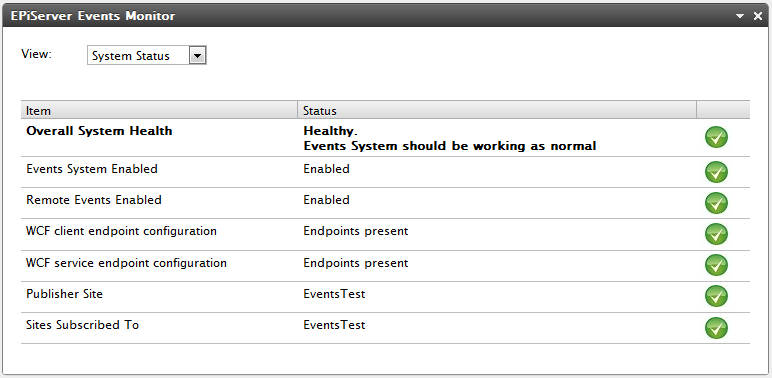
After the above problems have been fixed and Online Center refreshed we should then see a nice column of green ticks and the system should now be fully operational.
System Test
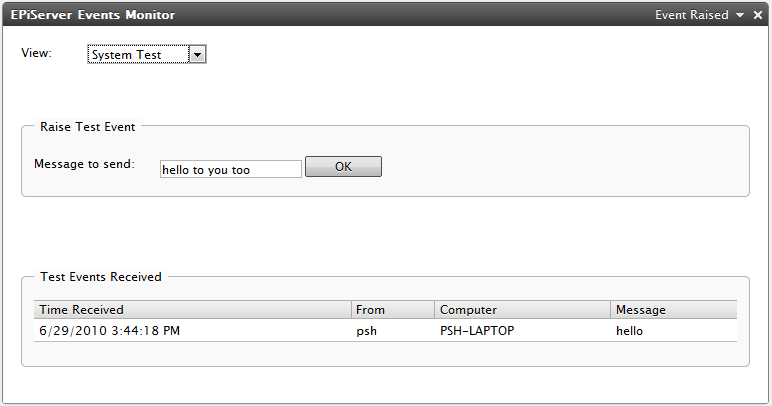
The System Test view allows you to send and receive a test event. This can be good when the System Status view reports a healthy system but you just want to make sure that event messages are flowing between servers / enterprise sites as desired.
Event Statistics
The Event Statistics view shows real-time numbers of events raised, missed, sent out and received in.
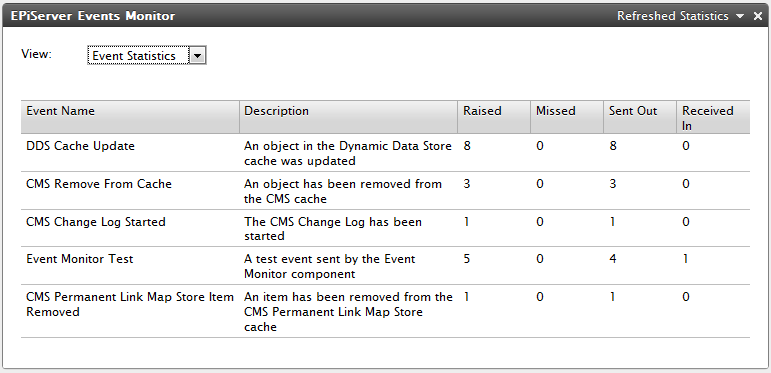
The raised count should be equal to the total sent out and received in. An event is treated as missed if events of the same type from the same server are received with later sequence numbers than the next one expected after a time period has expired (currently 5 seconds).
As the upcoming Relate+ 2.0 and EPiServer Community 4.0 releases also use the EPiServer Events System, this gadget can also be used in conjunction with these products too.
EPiServer Events Monitor Admin Plug-in For CMS 5 R2
As EPiServer CMS 5 was shipped before the release of OnlineCenter I have also built a CMS 5 Admin Plug-in version which has the System Status and System Test views. The Events Statistics view is not available in this version as that relies on new functionality introduced in the EPiServerFramework released with CMS 6 / Community 4.0.
Once installed, the plug-in should be visible in CMS Admin Mode under Tools on the Admin tab.
Downloads
EPiServer Events Monitor Gadget
(for CMS 6, CMS 6 R2, Community 4, Community 4 R2, Relate+ 2, Relate+ 2 R2)
EPiServer Events Monitor Admin Plug-in
(for CMS 5 R2 SP2)
To install these modules on a site, start the EPiServer Deployment Center, select the “Install a Module from a Compressed File” from the tree and then click “Run”. When prompted select the epimodule file downloaded and click “Next”. Proceed through the wizard selecting the CMS / Community / Relate+ site to install the module on.
Feel free to change / adapt the source code as you wish but please let me know if you find any bugs (see below).
Feedback
Any comments or problems experienced are gladly received by email to paul <dot> smith <at> episerver <dot> com. Please note that these components and source code are provided as is without guarantee or warranty and are not officially supported by EPiServer AB.

Comments