


Composer and PageTypeBuilder - continued
There has been several blog posts on how to get PageTypeBuilder to play nice with EPiServer Composer, Stefan Forsberg's excellent post being one of them. Since Stefan wrote his post, new versions of both Composer (4.0) and PageTypeBuilder (1.2) has been released.
Several issues has now been resolved, but there are still some small fixes that needs to be applied, and I thought I should share them with you.
NullReferenceExceptions
You might get errors when trying to create a new page or when visiting the Composer Tools page in admin mode.
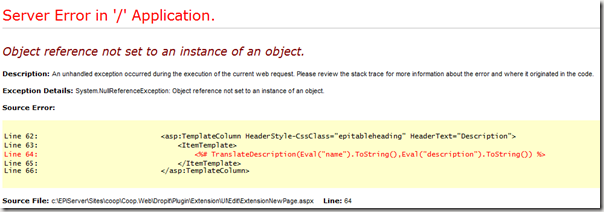
This is related to the way EPiServer treats the Description property of a PageType . Basically EPiServer will return an empty string if the Description is not set, while PageTypeBuilder returns null.
The quick fix for this is to change the code where Desrcription.ToString() is used:
In Dropit\Plugin\Extension\UI\Edit\ExtensionNewPage.aspx:
// Line 63 - old code
<%# TranslateDescription(Eval("name").ToString(),
Eval("description").ToString()) %>
// Line 63 - with quick fix
<%# TranslateDescription(Eval("name").ToString(),
Eval("description") as string ?? string.Empty) %>
// Line 87 - old code
<%# TranslateName(Eval("Description").ToString()).ToHtmlEncoded()%>
// Line 87 - with quick fix
<%# TranslateName(Eval("Description") as string ?? string.Empty).ToHtmlEncoded()%>
// Line 56 - old code
Text = '<%# Utils.TrimDescription(
DataBinder.Eval(Container.DataItem, "Description").ToString(),60).ToHtmlEncoded() %>'
// Line 56 - with quick fix
Text = '<%# Utils.TrimDescription(
DataBinder.Eval(Container.DataItem, "Description") as string ?? String.Empty,60).ToHtmlEncoded() %>'
These issues has been reported to support, so hopefully they will be fixed in upcoming releases (Bug #52421 reported by Frederik Viig).
Another (and a bit more boring) way around the issue is to make sure all your PageTypes has Description set.
PTB and Composer Functions
Refer to this post for a complete code sample on how to create Composer PageTypes and Functions using PageTypeBuilder.
Functions not visible in the Toolbox
I spent a lot of time investigating why the Toolbox neglected to list my functions.
When the functions are built and ready (using the approach described in the post mentioned above), you should see your new Composer functions in admin mode (ref screenshot below).
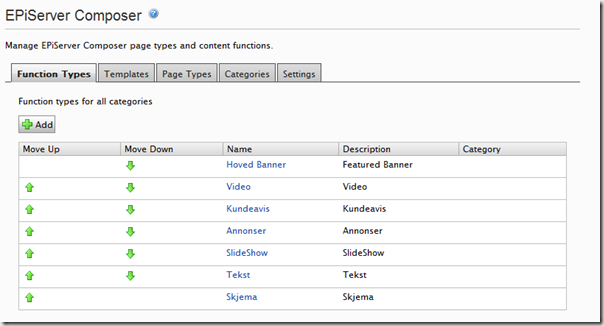
It is then important to complete the following steps for each function (using ‘Save and Continue’ on each step):
- Select function
- Select Access tab and set necessary access rights
- Set Rules
- Re-register content areas
If you miss the last step, the function will not appear in the Toolbox. Also, if you later try to re-register content areas, the function will still not be visible – seems like you need to change one of the other function properties (like Access or Rules) at the same time, in order for it to be saved. I’ve re-produced this a couple of times, but not yet reported is as a bug.

Comments