

Plugin to edit Profile properties in Edit / Admin
Users who have been around since the days of EPiServer 4 might remember that it was possible to edit user properties (name, address…) directly in the user settings. No such possibility even for the predefined SqlProfile properties exists in CM5 and later.
A long time ago I wrote a plugin to “restore” this functionality. I have been using it every now and then in projects without much modification, but never got around to post it on the web (I think, if this is a double post I apologize…). So here it is now!
Some words on the code
The thought was to build something that could be extended and configured. It therefore uses its own config section which maps different profile properties to use different implementations of the IProfileEditor interface. Simple implementations for string and DateTime are included (very simple, just textboxes, but one with validation).
Configuration
The configuration consists of a config section in web.config. Add the section declaration to /configuration/configSections:
<section name="profileEditor" type="ProfileEditor.Implementation.ProfileEditorConfiguration, ProfileEditor" />
and then add the actual configuration under /configuration, example:
<profileEditor>
<handlers>
<add propertyName="FirstName" editHeading="/admin/secedit/firstname" sortIndex="10" type="ProfileEditor.Implementation.Editors.StringEditor, ProfileEditor" />
<add propertyName="LastName" editHeading="/admin/secedit/lastname" sortIndex="20" type="ProfileEditor.Implementation.Editors.StringEditor, ProfileEditor" />
<add propertyName="ExpiryDate" editHeading="Datum då kontot upphör" sortIndex="140" options="AllowEmpty='true';DateFormat='yyyy-MM-dd HH:mm';" type="ProfileEditor.Implementation.Editors.DateTimeEditor, ProfileEditor" />
</handlers>
</profileEditor>
The propertyName should be equal to the one defined in the /configuration/profile/properties section. editHeading takes a string or a language path to show as label. The sortindex attributes are (surprise!) used to control the order in which the properties appear. The type gives the FullName,Assembly path to the IProfileEditor implementation used. Finally there’s an optional options attribute which can be used to pass extra settings to the IProfileEditor implementation. The attribute value is passed to the IProfileEditors init method so it can be stored and used to perform setup.
Example
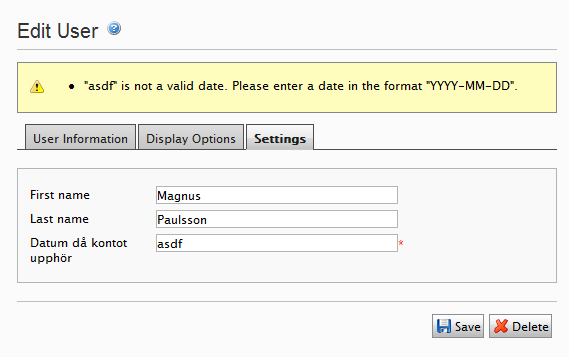
The configuration shown above renders the following fields in admin mode:
Code
The code is available, for use at your own risk!, from the EPiServer World Code Section: http://world.episerver.com/Code/Magnus-Paulsson/User-profile-properties-edit-plugin/

Comments