

A critical vulnerability was discovered in React Server Components (Next.js). Our systems remain protected but we advise to update packages to newest version. Learn More

Magnus Rahl
Feb 6, 2009
  3970
(0 votes)

Social bookmarking as Dynamic Content

Many of you have probably built sites with social bookmarking icons or similar (“Share on facebook” etc.). Just for fun I decided to create an easily extendable implementation for this, and to do it as Dynamic Content to enable editors to place whatever social bookmarking icons whereever they like.

Description

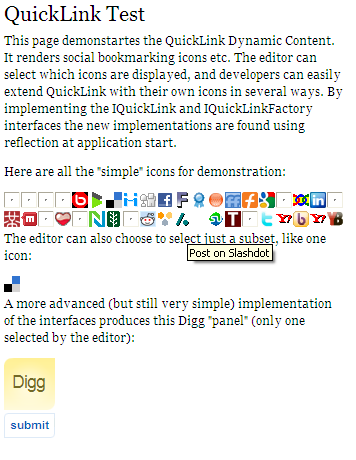
Here is a screen dump of an example page using my QuickLink Dynamic Content:
quicklink

The broken images seem to be broken because they are all gathered from their respective sites, and my browser seems to be handling this great amount of connections/lookups badly. I advice you to cache the images locally in your site (their location are set in a config file).

In edit mode the editor simply selects what implementations to include, so by adding the QuickLink dynamic content several times to a page with different icons enabled the layout can be controlled a bit more. What type of html element the icons are rendered in is also configurable (standard is ul/li).
profileinfo_edit

Extensions

All the icons in the first portion of the image above are generated by a special implementation of the IQuickLink/IQuickLinkFactory interfaces that is purely configuration driven. To add another bookmarking service, provided it follows the same pattern (a posting url with the page url and title in the query string) you merely have to add a new section in the QuickLink.config file.

The more advanced implementation last in the example is included mostly for demonstration how to implement the interfaces, the default configuration driven setup is probably enough for many purposes.

Download

Both compiled dlls and source are available here. N.B. the QuickLink dynamic content uses the DynamicContentBase also available from the same location.

Feb 06, 2009

Comments

Please login to comment.
Latest blogs
A day in the life of an Optimizely OMVP: Learning Optimizely Just Got Easier: Introducing the Optimizely Learning Centre

On the back of my last post about the Opti Graph Learning Centre, I am now happy to announce a revamped interactive learning platform that makes...

Graham Carr | Jan 31, 2026

Scheduled job for deleting content types and all related content

In my previous blog post which was about getting an overview of your sites content https://world.optimizely.com/blogs/Per-Nergard/Dates/2026/1/sche...

Per Nergård (MVP) | Jan 30, 2026

Working With Applications in Optimizely CMS 13

💡 Note:  The following content has been written based on Optimizely CMS 13 Preview 2 and may not accurately reflect the final release version. As...

Mark Stott | Jan 30, 2026

Experimentation at Speed Using Optimizely Opal and Web Experimentation

If you are working in experimentation, you will know that speed matters. The quicker you can go from idea to implementation, the faster you can...

Minesh Shah (Netcel) | Jan 30, 2026

How to run Optimizely CMS on VS Code Dev Containers

VS Code Dev Containers is an extension that allows you to use a Docker container as a full-featured development environment. Instead of installing...

Daniel Halse | Jan 30, 2026

A day in the life of an Optimizely OMVP: Introducing Optimizely Graph Learning Centre Beta: Master GraphQL for Content Delivery

GraphQL is transforming how developers query and deliver content from Optimizely CMS. But let's be honest—there's a learning curve. Between...

Graham Carr | Jan 30, 2026