

Page Rating Dynamic Content Module
Based on CMS 6
Back in January Paul Smith blogged about a pretty cool Page Rating Dynamic Content widget he built using Page Objects. I found this to be pretty useful for demonstrating the concept of basic rating in EPiServer CMS. After all, some things are better to show than to say “sure you could add that, it’s easy”. The code you will find in that blog was based on RC1 and the actual release had a few breaking changes which needed to be fixed for this to work. As a result I’ve hijacked Paul’s code, updated it, and uploaded it here. I also used a different star image for the rating system that I felt worked better within the Alloy Technologies templates. Paul’s looked a little too Captain America(ish) for my taste but I know it’s because he loves Americans and American English!  Of course, you can swap this out with any image you choose by placing your preferred image in the Images folder with the correct name. Note, with my update all page versions and languages of the page will share the rating. If you prefer a different approach this is changeable in the RatingControl.ascx.cs code by modifying the third parameter to pom.Save().
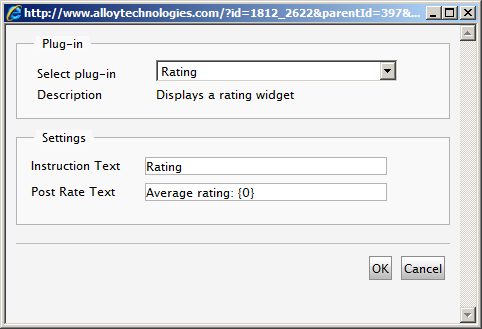
The configurable Dynamic Content widget looks as follows:
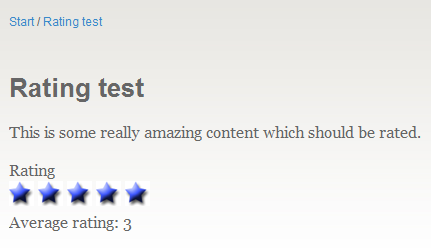
And the resulting page:
I have included a Visual Studio project which will auto-magically copy the necessary files to the expected locations *if* you place the core “Rating” folder in the code download in the root directory of your EPiServer site, add it to your main solution, and Build the project. Additionally you will need to add the line highlighted in yellow below to the <dynamicContent> section of episerver.config:
<dynamicContent>
  <controls>
    …
    <add description="Displays a Rating facility" name="Rating"
	type="EPiServer.Samples.RatingDC, Rating" />
…
</controls>
</dynamicContent> Enjoy!

Comments