

Setting the Edit Panel Tab Order in CMS 5
Based on CMS 5 R2 SP2
EPiServer CMS allows many different ways to plug-in and/or make changes to the user interface. If, for example, you want to add tabs to the Edit Panel and place the tab sort order there’s a few things you should know.
Tab order can be changed using the SortIndex property of the GuiPlugIn attribute. See example below:
- [GuiPlugIn( Description="Debug Plugin", SortIndex=900, Area=PlugInArea.EditPanel, DisplayName="Debug Info", Url="~/Templates/Units/Debug.ascx")]
- public partial class Debug : EPiServer.UserControlBase
- {
- protected void Page_Load(object sender, EventArgs e)
- {
To set the order of your tabs you’ll want to understand the existing tab sort order and how the View tab is rendered:
The Edit tab has a SortIndex of 200. The Version tab has a SortIndex of 500. Workflow and Statistics do not set a SortIndex and rely on a default of 1000. The View tab has special handling, as this is rendered via markup rather than a plug-in, and does not have a sort index. This means the View tab will remain the left most tab unless you find another way to change that order. :) So, to place tabs in various order you simply need to change the SortIndex with the above in mind.
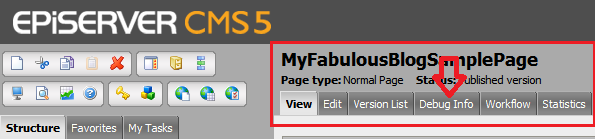
The screen shot below shows a sample tab called Debug Info placed at the SortIndex of 900. Logically 900 comes after the Version tab (500) and before Workflow and Statistics (1000). The result of this configuration is below:
Enjoy!

Comments