

CMO LPO “Visitors Included in the Test” Setting Explained (based on CMO 1.0)
CMO allows the user to configure the percent of users included in an LPO test via the “Visitors Included in the Test” setting. One of the main reasons for this configuration is because some customers, especially those with high traffic sites, may not want all of their traffic to be included in the test. Questions have arisen regarding how this works so I thought it might be useful to post some of the details in a blog. The information below represents my understanding. If anyone disagrees or has additional feedback feel free to add your input.
The visitors included in the test can be up configured to a value of up to 100%. That configurable amount of traffic included in the test will then be divided equally amongst the number of pages included in the actual test. This means that if two pages are included in the test the traffic division will be split 50%/50% for the percentage of visitors included in the test. If there are three pages included in the test the traffic division will be roughly 33%/33%/33% for the percentage of visitors included in the test. In both of the previous sentences I highlighted “percentage of visitors included in the test” mainly because there is an entirely different bucket of visitors which is those visitors NOT included in the test.
In order to help clarify I will provide an example of one possible configuration:
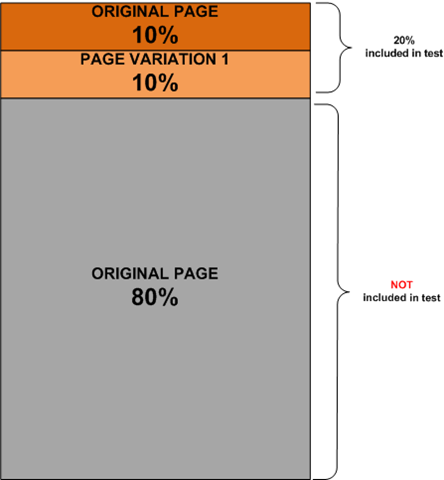
If you specify 20% of visitors to be included in the test and have two page variants, the original which I’ll call ORIGINAL PAGE and a variant which I’ll call TEST PAGE A, the end result will be that 10% will be included in the test and see ORIGINAL PAGE, another 10% will be included in the test and see TEST PAGE A, and 80% will still see the ORIGINAL PAGE but will NOT be included in test. The 10% for ORIGINAL PAGE and the 10% for TEST PAGE A total the 20% that was configured to be included in the test. The image below represents this distribution:
Additional details on this configuration setting can be found in the EPiServer CMO User Guide. I hope this helps.

Comments