
Building custom criteria for Visitor groups in EPiServer 7.5
Magnus Rahl wrote a blog post on how to do this in CMS 6 R2 and this is a complement to that post that shows how to do it in EPiServer 7.5, for explanations on what visitor groups are and so, please see the origin blog post that you can find here: http://world.episerver.com/Blogs/Magnus-Rahl/Dates/2010/12/Building-custom-criteria-for-Visitor-groups-in-CMS-6-R2/.
Buildning a custom criterion: Browser
I am using the same example that Magnus did, with one addition, I add Chrome as a browser as it is now one of the most used browsers out there.
Creating a model
In 7.5 this is even more simple than it was in 6 R2 because EPiServer has a baseclass that does much for you, so this is how the same example looks like in 7.5
using System.ComponentModel.DataAnnotations;
using EPiServer.Filters;
using EPiServer.Personalization.VisitorGroups;
using EPiServer.Web.Mvc.VisitorGroups;

namespace DeployToAzureDemo.Models.VisitorGroupCriterion
{
    public class BrowserModel : CriterionModelBase
    {
        [DojoWidget(
        SelectionFactoryType = typeof(EnumSelectionFactory),
        LabelTranslationKey = "/shell/cms/visitorgroups/criteria/browser/browsertype",
        AdditionalOptions = "{ selectOnClick: true }"),
        Required]
        public BrowserType Browser { get; set; }

        [DojoWidget(
            SelectionFactoryType = typeof(EnumSelectionFactory),
            LabelTranslationKey = "/shell/cms/visitorgroups/criteria/browser/comparecondition",
            AdditionalOptions = "{ selectOnClick: true }"),
            Required]
        public CompareCondition Condition { get; set; }
        [DojoWidget(
            DefaultValue = 0,
            LabelTranslationKey = "/shell/cms/visitorgroups/criteria/browser/majorversion",
            AdditionalOptions = "{ constraints: {min: 0}, selectOnClick: true }"),
            Range(0, 0xff)]
        public int MajorVersion { get; set; }

        public override ICriterionModel Copy()
        {
            return ShallowCopy();
        }
    }

    public enum BrowserType
    {
        IE,
        FireFox,
        Chrome,
        Other
    }
}
The main difference is that you are now no longer needed to inherit from IDynamicData and ICloneable, all this is handled inside CriterionModelBase.
Creating the criterion
Here not much has happened, the main thing is that you no longer need to create a enum with compareconditions, this you can get from EPiServer.Filter. The other thing is that Internet Explorer does no longer identify it self as ie (at least not IE11 that I have) so I had to add an else-condition for the name internetexplorer string also. So the code looks like this now:
using System;
using System.Security.Principal;
using System.Web;
using DeployToAzureDemo.Models.VisitorGroupCriterion;
using EPiServer.Filters;
using EPiServer.Personalization.VisitorGroups;

namespace DeployToAzureDemo.Business.VisitorGroupCriterion
{
    [VisitorGroupCriterion(
        Category = "User Criteria",
        DisplayName = "Browser",
        Description = "Criterion that matches type and version of the user's browser",
        LanguagePath = "/shell/cms/visitorgroups/criteria/browser")]
    public class BrowserCriterion : CriterionBase<BrowserModel>
    {
        public override bool IsMatch(IPrincipal principal, HttpContextBase httpContext)
        {
            return MatchBrowserType(httpContext.Request.Browser.Browser) &&
                   MatchBrowserVersion(httpContext.Request.Browser.MajorVersion);
        }

        protected virtual bool MatchBrowserVersion(int majorVersion)
        {
            switch (Model.Condition)
            {
                case CompareCondition.LessThan:
                    return majorVersion < Model.MajorVersion;
                case CompareCondition.Equal:
                    return majorVersion == Model.MajorVersion;
                case CompareCondition.GreaterThan:
                    return majorVersion > Model.MajorVersion;
                case CompareCondition.NotEqual:
                    return majorVersion != Model.MajorVersion;
                default:
                    return false;
            }
        }

        protected virtual bool MatchBrowserType(string browserType)
        {
            browserType = (browserType ?? String.Empty).ToLower();
            if (browserType.Equals("ie") || browserType.Equals("internetexplorer"))
            {
                return Model.Browser == BrowserType.IE;
            }
            if (browserType.Equals("firefox"))
            {
                return Model.Browser == BrowserType.FireFox;
            }

            if (browserType.Equals("chrome"))
            {
                return Model.Browser == BrowserType.Chrome;
            }

            return Model.Browser == BrowserType.Other;
        }
    }
}
Translation
For this to work in the editor we need to add translation to it and I am just like the original blog post doing this by adding a language file to /Resources/LanguageFiles so it will automatically be discovered by EPiServer. For that to happen you need to have this code in your EPiServer.Framework section:
<localization fallbackBehavior="Echo, MissingMessage, FallbackCulture" fallbackCulture="en">
  <providers>
    <add virtualPath="~/Resources/LanguageFiles" name="languageFiles" type="EPiServer.Framework.Localization.XmlResources.FileXmlLocalizationProvider, EPiServer.Framework" />
  </providers>
</localization>
Then the language file looks like this:
<languages>
  <language name="English" id="en">
    <enums>
      <deploytoazuredemo>
        <models>
          <visitorgroupcriterion>
              <browsertype>
                <ie>Internet Explorer</ie>
                <firefox>Firefox</firefox>
                <chrome>Chrome</chrome>
                <other>Other browser</other>
              </browsertype>
            </visitorgroupcriterion>
        </models>
      </deploytoazuredemo>
      <episerver>
        <filters>
          <comparecondition>
            <lessthan>Less than</lessthan>
            <equal>Equal to</equal>
            <greaterthan>More than</greaterthan>
            <notequal>Not equal to</notequal>
            <startswith>Starts with</startswith>
            <endswith>Ends with</endswith>
            <contained>Contains</contained>
          </comparecondition>
        </filters>
      </episerver>
    </enums>
    <shell>
      <cms>
        <visitorgroups>
          <criteria>
            <browser>
              <browsertype>Browser type</browsertype>
              <comparecondition>With version</comparecondition>
              <majorversion>Major version</majorversion>
            </browser>
          </criteria>
        </visitorgroups>
      </cms>
    </shell>
  </language>
</languages>
Notice that the path to the browsertyp element is the same as the namespace for that enum: DeployToAzureDemo.Models.VisitorGroupCriterion but with only lower case.
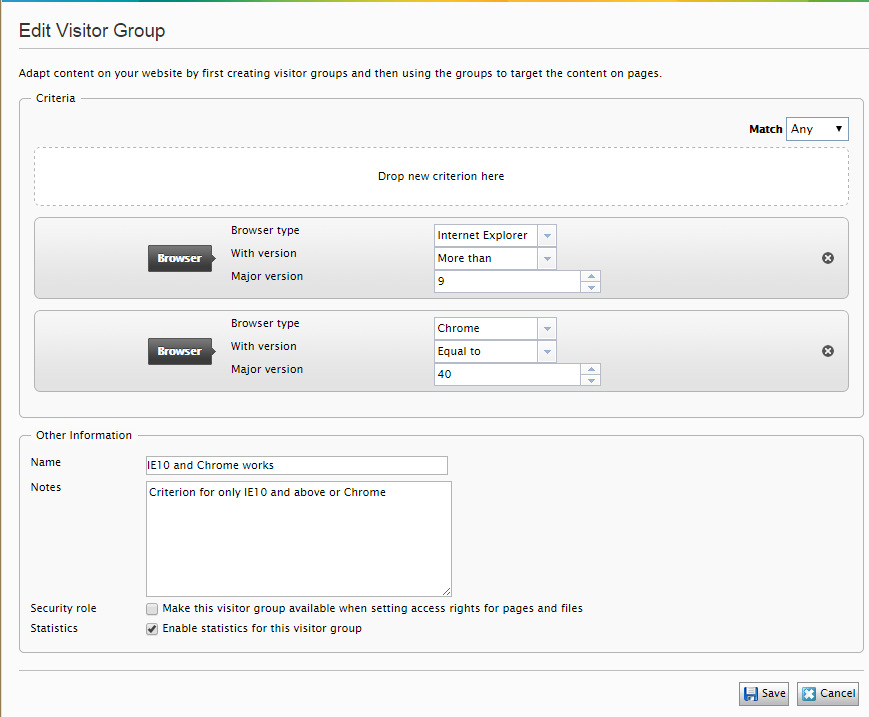
After this is done you can create a new visitor group with for example this criterions
And then applying it to a page like this
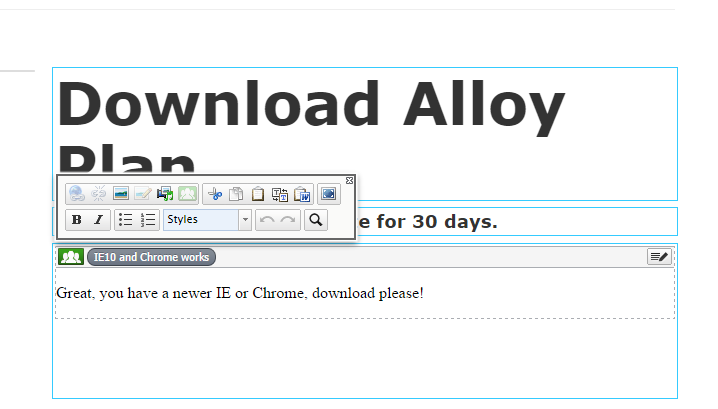
So it is very easy to create these on your own and very simple an effective to use!
Happy coding!

Comments