
Community Recognition Program – The Parts You Don’t See
As you may or may not have noticed, we’ve just released (Tuesday 20th) our community recognition program (CRP). We’ve published a page about the community recognition program explaining how to score points etc., but we though we’d show you how it was built. It’s not super advanced or anything, but hopefully it can act as another sample for how to work with the DDS.
Firstly, here’s a picture I drew to illustrate how it all works:
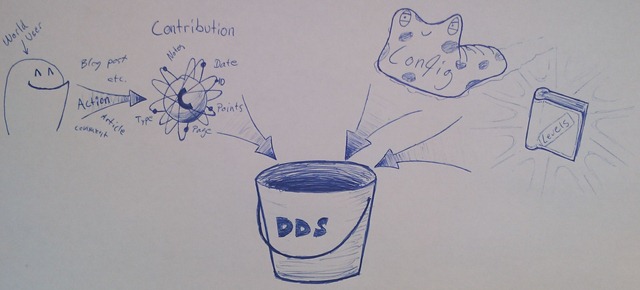
As you can see, all the things you users do on EPiServer World, like post blogs (syndicated blogs also count), write comments, reply to forum threads etc, generates a contribution object that goes into the DDS bucket. The contribution object holds info about date, type (blog post, article, etc), pageid (to link a contribution to a page if relevant), points, user and notes (for internal use).
As shown in the picture, the DDS also holds the config monster and a book of levels. These two enable us to set how much points each contribution should be worth and how many points you need to advance to a higher level.
To make all this work, we’ve used a little something we like to call “code”, Let’s dig in!
Firstly we have a plug-in to subscribe to the relevant events and handle the creation of contribution points whenever you, well, contribute.
1: public class CommunityRecognitionPlugin : PlugInAttribute
2: {
3: public static void Start()
4: {
5: // this will set us up the bomb
6: DataFactory.Instance.DeletedPage += new PageEventHandler(Instance_DeletedPage);
7: DataFactory.Instance.PublishedPage += new PageEventHandler(Instance_PublishedPage);
8: DataFactory.Instance.MovedPage += new PageEventHandler(Instance_MovedPage);
9: }
10:
11: ...
12:
13: static void Instance_PublishedPage(object sender, PageEventArgs e)
14: {
15: ...
16: else if (e.Page.PageTypeName == "Article")
17: {
18: string contributor = e.Page["crmAuthor"] as string ?? "N/A";
19: Data.AddContribution(contributor, ContributionType.article, e.Page.PageLink.ID, false);
20: }
21: ...
22: }
23:
24: ...
25: }
The plug-in simply pulls out the relevant information from the pages and sends the values to our contribution data layer that handles all dealing with the DDS.
1: public static class Data
2: {
3: public static ILog log = LogManager.GetLogger(typeof(Data));
4:
5: public static EPiServer.Data.Dynamic.DynamicDataStore GetStore(Type t)
6: {
7: // GetStore will only return null the first time this method is called for a Type
8: // In that case the ?? C# operator will call CreateStore
9: // http://world.episerver.com/Blogs/Paul-Smith/Dates1/2010/1/Using-a-DynamicDataStore-instance-correctly/
10: return EPiServer.Data.Dynamic.DynamicDataStoreFactory.Instance.GetStore(t) ??
11: EPiServer.Data.Dynamic.DynamicDataStoreFactory.Instance.CreateStore(t);
12: }
13:
14: ...
15:
16: //There are a bunch of overloads for AddContribution but they all end up in SaveContribution
17: public static void SaveContribution(Contribution c, bool skipProfileUpdate)
18: {
19: if(log.IsInfoEnabled)
20: log.InfoFormat("Saving contribution for {0} of type {1} (pageid:{2}).", c.Contributor, c.Action.ToString(),c.ContributionPageID);
21:
22: //This is just to filter out some old stuff, like EP Import
23: if (Util.IsBannedName(c.Contributor))
24: return;
25:
26: DynamicDataStore store = GetStore(typeof(Contribution));
27: store.Save(c);
28: if(log.IsInfoEnabled)
29: log.InfoFormat("Saved contribution for {0} of type {1} (pageid:{2}).", c.Contributor, c.Action.ToString(), c.ContributionPageID);
30:
31: if (!skipProfileUpdate)
32: UpdateProfileLevel(c.Contributor);
33:
34: if(c.Action != ContributionType.ecd)
35: CheckAndAddECDContribution(c.Contributor);
36: }
37:
38: public static void DeleteContribution(Contribution c, bool skipProfileUpdate)
39: {
40: DynamicDataStore store = GetStore(typeof(Contribution));
41: store.Delete(c);
42:
43: if(!skipProfileUpdate)
44: UpdateProfileLevel(c.Contributor);
45: }
46:
47: ...
48:
49: public static List<Contribution> GetContributions(string contributor)
50: {
51: DynamicDataStore store = GetStore(typeof(Contribution));
52: List<Contribution> contributions = (from c in store.Items<Contribution>()
53: where c.Contributor == contributor
54: select c).ToList<Contribution>();
55: return contributions;
56: }
57:
58: ...
59:
60: // The ContributionData object is used by our recognition gadget and is generated on the fly rather than storing it in the DDS
61: public static ContributionData GetContributionDataForContributor(string contributor)
62: {
63: List<Contribution> contribs = GetContributions(contributor);
64:
65: int score = 0;
66: foreach (var contribution in contribs)
67: {
68: score += contribution.Points;
69: }
70:
71: return new ContributionData()
72: {
73: Contributor = contributor,
74: Count = contribs.Count,
75: Score = score
76: };
77: }
78:
79: ...
80: }
Sure, I’ve removed a lot of code for clarity, but basically, that’s about it.
I won’t show the recognition gadget, because it’s really nothing fancy, or pretty, but I might be back with another blog post covering some gadget stuff.
Some cred should go to Pontus Lidén who built the first prototype of the CRP during his internship with us.

Comments