A critical vulnerability was discovered in React Server Components (Next.js). Our systems remain protected but we advise to update packages to newest version. Learn More

Eric
Feb 23, 2016
  18562
(0 votes)

Fixing the WebSocket Protocol Support issue when upgrading to EPiServer UI 9.4.0

I experienced a small but annoying error today when I installed a brand new CMS website with latest updates and also upgraded a website to the latest version of episerver cms.

The error occurred inside edit mode but did not show in Internet Explorer. The error message in episerver was:

“A real-time connection could not be established with the server. This may be caused by incorrect configuration. Please see the User interface section in the user guide for further information.”

So something must have happened in the latest release since I did not have this message last week. Firebug did the trick and help with finding the error:

Firefox can't establish a connection to the server at wss://yoursite.com/EPiServer/Shell/socket/endpoint/.
socket = new WebSocket(this._path);


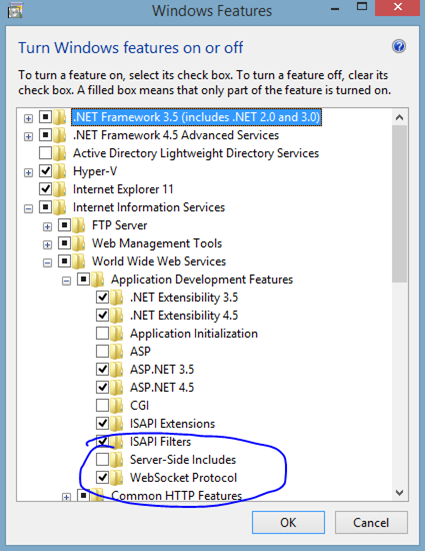
Fixing the problem is to install websocket support like below.

For Windows Server 2012
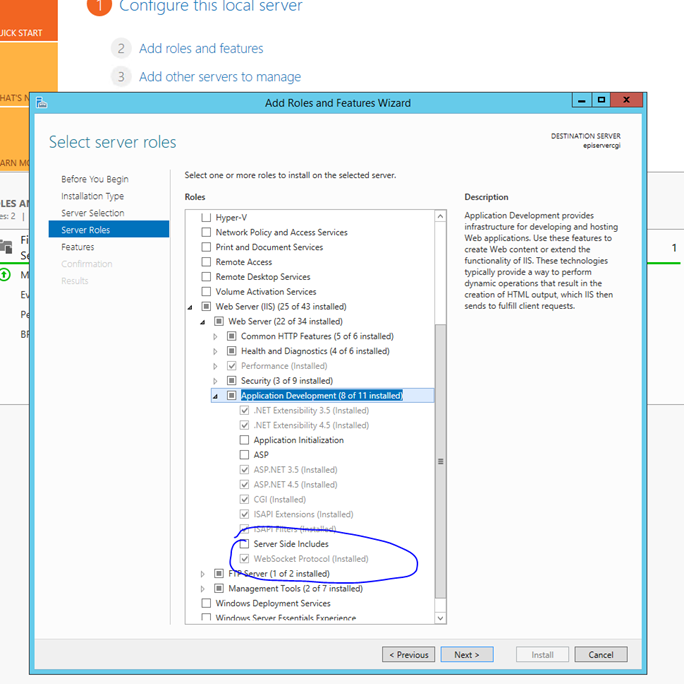
server_thumb3


And for Windows 8 and above:

win8_thumb3


Update (Thanks Stephan):

If you are using an older system IIS 7.5 or below you will need to disable WebSockets to get rid of the error message.

<add key="Epi.WebSockets.Enabled" value="false" />

You can find more information at:

http://world.episerver.com/documentation/Items/Developers-Guide/Episerver-CMS/9/User-interface/websocket-support/

http://www.iis.net/learn/get-started/whats-new-in-iis-8/iis-80-websocket-protocol-support

Feb 23, 2016

Comments

Please login to comment.
Latest blogs
A day in the life of an Optimizely OMVP: Learning Optimizely Just Got Easier: Introducing the Optimizely Learning Centre

On the back of my last post about the Opti Graph Learning Centre, I am now happy to announce a revamped interactive learning platform that makes...

Graham Carr | Jan 31, 2026

Scheduled job for deleting content types and all related content

In my previous blog post which was about getting an overview of your sites content https://world.optimizely.com/blogs/Per-Nergard/Dates/2026/1/sche...

Per Nergård (MVP) | Jan 30, 2026

Working With Applications in Optimizely CMS 13

💡 Note:  The following content has been written based on Optimizely CMS 13 Preview 2 and may not accurately reflect the final release version. As...

Mark Stott | Jan 30, 2026

Experimentation at Speed Using Optimizely Opal and Web Experimentation

If you are working in experimentation, you will know that speed matters. The quicker you can go from idea to implementation, the faster you can...

Minesh Shah (Netcel) | Jan 30, 2026