

How to extend the search in Relate+ 2.0 for showing CMS-pages..
As many of you might now I left EPiServer two weeks ago for a new adventure at Logica… But before I left I was working a lot with a project about migration from Relate+ to Relate+ 2.0, http://world.episerver.com/Articles/Items/Migrate-EPiServer-Relate-1-to-EPiServer-Relate-2/.
If you start a new project you will soon find out that there are no search for ordinary cms content. Even though Relate+ 2.0 have search for all community content, and cms-pages as well.
So on EPiCenter, EPiServer’s own intranet, they had a lot of pages that needed to be found. So what I needed to do was to extend the existing functionality with a little bit more code.
Checklist:
- We need to create a new menuitem on the searchpage.
- Add a new usercontrol to our project for rendering the result.
- Add some logic to extend the search so it will handle cms-pages as well.
Create a new usercontrol:
So we add a new usercontrol in the SearchControls folder:
My code ended up like this:
<hr />
<div class="SearchResultHeader">
<h1 id="lblResultTitle" runat="server">
</h1>
<span runat="server" id="lblResultHitCount" class="SearchResultCount"></span>
</div>
<asp:ListView ID="lvSearchResult" runat="server" ItemPlaceholderID="pnlItemContainer">
<LayoutTemplate>
<div class="mainList">
<asp:Panel ID="pnlItemContainer" runat="server" />
</div>
</LayoutTemplate>
<ItemTemplate>
<div class="itemContentPanel">
<div class="itemDetails">
<h2>
<asp:HyperLink ID="hlTitle" runat="server" NavigateUrl="<%# GetLinkUrl(Container.DataItem) %>"
Text="<%# GetTitle(Container.DataItem) %>" />
</h2>
<div class="comment" style="margin: 0 0 5px 0;">
<span style="margin-right: 10px;">(<%# GetFriendlyTypeName(((EPiServer.Search.IndexResponseItem)Container.DataItem).ItemType)%>)
<%= Translate("/general/posted") %><%# GetPostedTime((EPiServer.Search.IndexResponseItem)Container.DataItem) %></span>
</div>
<%# GetDesc(Container.DataItem) %>
</div>
</div>
</ItemTemplate>
<EmptyDataTemplate>
<div class="itemSummary">
<h3>
<%= Translate("/search/nosearchresult")%></h3>
</div>
</EmptyDataTemplate>
</asp:ListView>
<div runat="server" id="searchPager" class="SearchResultPagination">
</div>
We also need to create some logic:
namespace EPiServer.Templates.RelatePlus.Templates.RelatePlus.UserControls.SearchControls
{
public partial class PagesResult : EPiServer.Templates.RelatePlus.UserControls.Base.SearchControlBase
{
/// <summary>
/// Title of the result box
/// </summary>
public override string ResultTitle
{
get
{
return this.lblResultTitle.InnerText;
}
set
{
this.lblResultTitle.InnerText = value;
}
}
/// <summary>
/// number of the search hitcount
/// </summary>
public override string ResultHitCount
{
get
{
return this.lblResultHitCount.InnerText;
}
set
{
this.lblResultHitCount.InnerText = value;
}
}
#region Method overrides
public override void DataBind()
{
// Bind the usercollection to show
if (SearchResults != null)
{
lvSearchResult.DataSource = SearchResults.IndexResponseItems;
lvSearchResult.DataBind();
CreatePagerControls(searchPager);
}
}
#endregion
#region Protected Methods
protected override string GetDesc(object dataItem)
{
var responseItem = dataItem as EPiServer.Search.IndexResponseItem;
if (responseItem != null)
{
if (responseItem.ItemType == typeof(EPiServer.Core.PageData).GetSearchFieldItemType())
{
string seachitem = responseItem.Id;
string myguid = seachitem.Substring(0, 36);
var pageguid = new Guid(myguid);
PermanentPageLinkMap map = PermanentLinkMapStore.Find(pageguid) as PermanentPageLinkMap;
PageData pd = GetPage(map.PageReference);
if (pd != null)
return pd["MainBody"].ToString().FormatContentTextNoHtml().Crop(100);
}
}
return base.GetDesc(dataItem);
}
#endregion
}
}
The important part of this code is the method protected override string GetDesc(object dataItem), this will get some of the text indexed on the specific page in the property mainbody. You could make some changes so that it will take all text that is index on the specific page by changing this:
if (responseItem.ItemType == typeof(EPiServer.Core.PageData).GetSearchFieldItemType())
{
string seachitem = responseItem.Id;
string myguid = seachitem.Substring(0, 36);
var pageguid = new Guid(myguid);
PermanentPageLinkMap map = PermanentLinkMapStore.Find(pageguid) as PermanentPageLinkMap;
PageData pd = GetPage(map.PageReference);
if (pd != null)
return pd["MainBody"].ToString().FormatContentTextNoHtml().Crop(100);
}
To instead use responseItem.DisplayText().
if (responseItem.ItemType == typeof(EPiServer.Core.PageData).GetSearchFieldItemType())
{
return responseItem.DisplayText.FormatContentTextNoHtml().Crop(100);
}
This will result in that all text will be included from other properties on the specific page as well.
Connect the usercontrol to the searchresult page
First I add a new menuitem to search.aspx
<div class="filterItem<%= Filter.Equals("pages") ? " selected" : string.Empty %>">
<a class="filterItemLink" href="<%= PagesResultPageLink %>" title="Pages">Pages</a>
<span class="filterListLoadingIndicator"></span>
</div>
We now need to create a property called PageResultPageLink in code behind:
public string PagesResultPageLink
{
get
{
return UriSupport.AddQueryString(SearchResultPageLink, "f", "pages");
}
}
Now I need to get the result for pages and to do that we need to do some changes in SearchResult.aspx. Ee need to create a new method called LoadPageResult() and use that in the Onload method on SearchResult.aspx.
The LoadPageResult()-method should now use our usercontrol that we created earlier, something like this:
/// <summary>
/// New search method
/// </summary>
/// <returns></returns>
private int LoadPageResult()
{
// load the user control for this type of entity
PagesResult userControlToLoad = (PagesResult)Page.LoadControl("~/Templates/RelatePlus/UserControls/SearchControls/PagesResult.ascx");
phResultControl.Controls.Add(userControlToLoad);
if (userControlToLoad.ItemPerPage <= 0)
{
userControlToLoad.ItemPerPage = this.ItemPerPage;
}
SearchResults searchResults = GetSearchResults(_query, _page, userControlToLoad.ItemPerPage, new Type[] {
typeof(PageData)
});
return BindDisplayControlForSearchResult(searchResults, userControlToLoad, "pages");
}
and the changes to OnLoad should end up something like this:
// Call base
base.OnLoad(e);
switch (_filter.ToLower())
{
case "image":
LoadImageResult();
break;
case "video":
LoadVideoResult();
break;
case "blog":
LoadBlogResult();
break;
case "forum":
LoadForumResult();
break;
case "member":
LoadMemberResult();
break;
case "club":
LoadClubResult();
break;
case "pages" :
LoadPageResult();
break;
case "all":
LoadAllKindOfElementResult();
break;
}
Finally we need to add the LoadPageResult() to LoadAllKindOfElementResult(), method for rendering all searchcategories, as well. Otherwise pages will not show unless the visitor clicks on the menu item for showing pages. This method can be found in SearchResult.aspx.cs.
private void LoadAllKindOfElementResult()
{
int nTotalResult = 0;
nTotalResult += LoadImageResult();
nTotalResult += LoadVideoResult();
nTotalResult += LoadBlogResult();
nTotalResult += LoadForumResult();
nTotalResult += LoadMemberResult();
nTotalResult += LoadClubResult();
nTotalResult += LoadPageResult();
if (nTotalResult <= 0)
{
lblUserSearch.InnerHtml = Translate("/search/nosearchresultforkeyword") + string.Format("<b>{0}</b>", HttpUtility.HtmlEncode(_query));
}
}
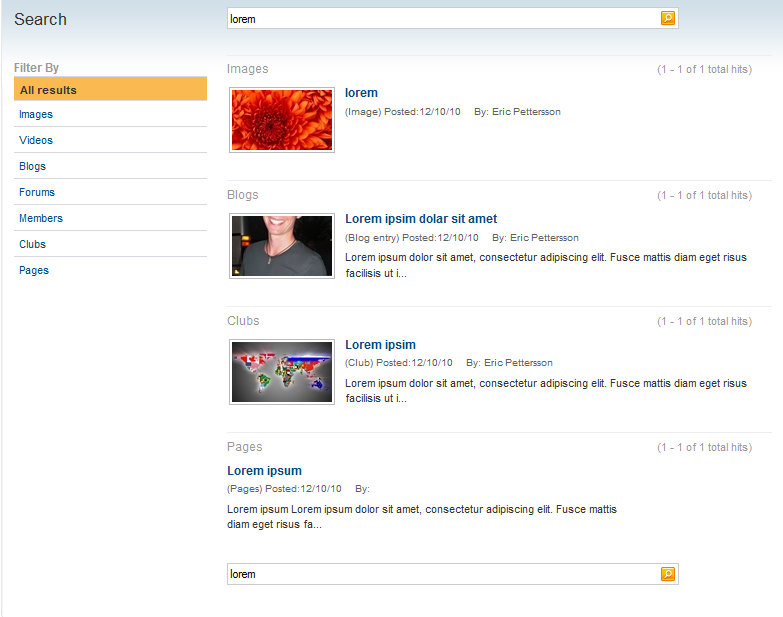
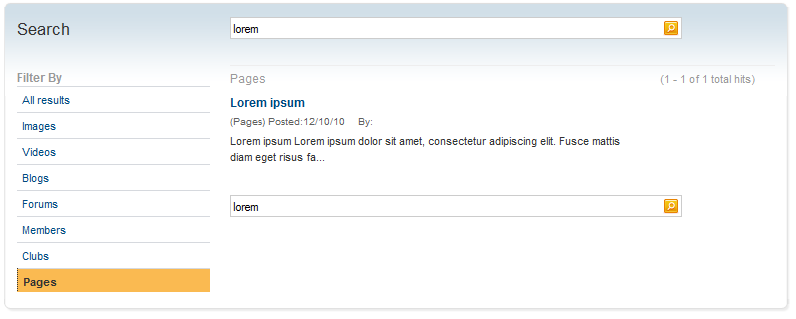
The result will look something like this:
Well I think thats about it and now we have extended the Relate+ 2.0 templates so that it uses the index for ordinary cmspages as well 
If you are experience any problems getting the indexed results, you will need to check the adress of the indexingservice. I made changes to the default installation so that the site could be found on localhost:17000 and therfore I had to change the indexingservice as well to use the same adress, otherwise it uses the computername instead of localhost by default.
You can also download the migration tool, and use the reindex tool included in that package to get a new index.
/Eric

Comments