

Quick Translate gadget
Hi! Here is my little contribution to Gadget Contest 2009 – Quick Translate gadget.

I believe that user doesn’t want to click on many dropdowns, radio buttons, checkboxes, etc to define complex translation settings.
The main idea is to provide convenient tool for quick translation of short texts and pages.
As an alternative you can use staggering Ruwen’s gadget and find something for translation in 170000 third party gadgets :)
Key features:
Type and go! Just type or paste text and submit by Enter, that’s it. Quick translate gadget is not intended for long texts translation. You won’t see any text area controls and don’t have to click on a submit button.
Detect my language! Source language is detected automatically and indicated below the translated text. We avoid extra control and don’t make user to specify source language. It is quick and simple. Moreover user might not know what source language is.
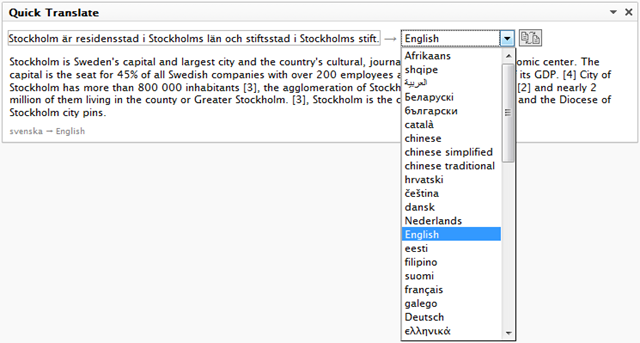
The more words you input the more correctly source language is determined.
Translate my page! You can submit any URL and get translated page in a new window.
Remember me! Since we have minimal control set, there is only one setting: translation result language. Gadget will remember your last choice and this language will be selected when you back tomorrow. Or next year. Until you clear cookies.
Technical details
Yes, it uses Google AJAX Language API.
One strange thing is that Google returns not localized list of supported languages, even when you specify required culture. My solution: I load the list of native names of .NET neutral cultures using AJAX and then build dropdown of supported languages.
Download and installation
Module can be installed on existing EPiServer CMS 6 site using Deployment Center.
Unpack sources to Modules folder of your site.

Comments