
Uploading blobs to DXP
I recently went searching for how to upload blobs into DXP and thought it would probably be good to share my experience since I didn't find any relevant documentation for this area.
When signing up to the DXP service you will get access to the paas portal at https://paasportal.episerver.net/. You might think you could upload blobs there but you will be wrong. That portal will make it possible to move content and blobs between environments however.
There is also a deployment api that you can use to automate deploys from Azure devops or similar. Perfect for deploying code and configurations to you new web app but sadly not blobs.
For integration you will also get access to portal.azure.com where you can see your resources in Azure including webapp and Application insights. This is normally where you will also see your connected storage account for a normal Azure web site. But alas, no.
Uploading using Azure Storage Explorer
The "secret" tool is the Azure Storage Explorer that you can download and install yourself. Ask Optimizely support for an account to your integration environment and you are in business! Add your new account by clicking on the person icon and far far bottom left you can find and "Add an account" option. Choose "Storage account or service"
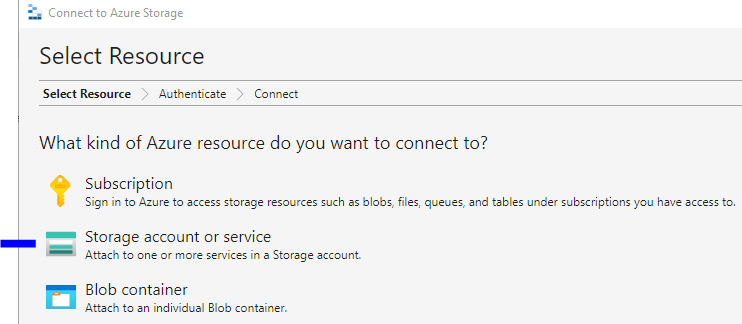
and then set the Account name and key you get from Optimizely support. You are in business!
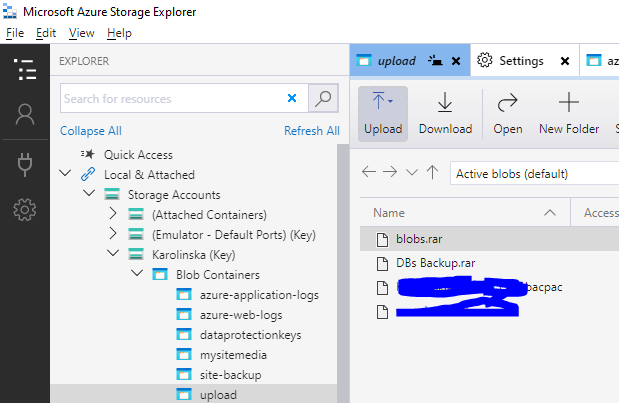
Upload folder is great for sharing bacpac files with Optimizely support and there, finally
/mysitemedia
is where you need to upload your precious blobs.
Configure solution to use the blobs
While you are at it you might want to configure your solution to actually use those blobs as well.
For your Web.Integration.config you will also need to point out this folder to tell the CMS to use your new blobs:
...
<blob defaultProvider="azureblobs">
      <providers>
        <add name="azureblobs" type="EPiServer.Azure.Blobs.AzureBlobProvider,EPiServer.Azure"
              connectionStringName="EPiServerAzureBlobs" container="mysitemedia"/>
      </providers>
</blob>
...
Happy coding!

Comments