
Extending ContentArea to use custom CSS class on child elements
In EPiServer 7.5 there is support for selection DisplayOption for items in a ContentArea. The build in support will change the tag the item is rendered with. But if you want to render it with the default tag and just add some CSS to the item this is a way of doing it.
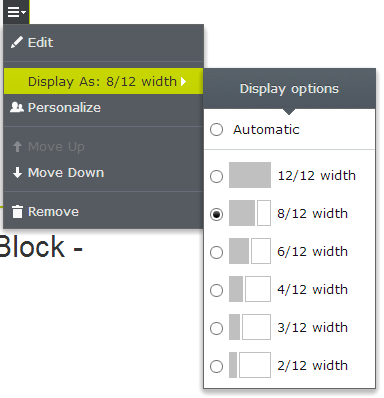
First, I made myself a DisplayOptionWithCss class
public class DisplayOptionWithCss : DisplayOption
{
    public DisplayOptionWithCss() { }
    public DisplayOptionWithCss(string id, string name,string tag,string iconClass,string cssClass)
    {
        this.Id = id;
        this.Name = name;
        this.Tag = tag;
        this.IconClass = iconClass;
        this.CssClass = cssClass;
    }
    public string CssClass { get; set; }
}
Second I added the options inside the Global.asax
public class EPiServerApplication : EPiServer.Global
{
protected void Application_Start()
{
    var options = ServiceLocator.Current.GetInstance<DisplayOptions>();
    options
        .Add(new DisplayOptionWithCss(ContentAreaTags.Col12, "12/12 width", "", "col12 LayoutGrid", "col-sm-12"))
        .Add(new DisplayOptionWithCss(ContentAreaTags.Col8, "8/12 width", "", "col8 LayoutGrid", "col-md-8 col-sm-6 col-xs-12"))
        .Add(new DisplayOptionWithCss(ContentAreaTags.Col6, "6/12 width", "", "col6 LayoutGrid", "col-md-6 col-sm-6 col-xs-12"))
        .Add(new DisplayOptionWithCss(ContentAreaTags.Col4, "4/12 width", "", "col4 LayoutGrid", "col-md-4 col-sm-6 col-xs-12"))
        .Add(new DisplayOptionWithCss(ContentAreaTags.Col3, "3/12 width", "", "col3 LayoutGrid", "col-md-3 col-sm-4 col-xs-6"))
        .Add(new DisplayOptionWithCss(ContentAreaTags.Col2, "2/12 width", "", "col2 LayoutGrid", "col-md-2 col-sm-4 col-xs-12"));
    AreaRegistration.RegisterAllAreas();
}
public static class ContentAreaTags
{
    public const string Col2 = "Col2";
    public const string Col3 = "Col3";
    public const string Col4 = "Col4";
    public const string Col6 = "Col6";
    public const string Col8 = "Col8";
    public const string Col12 = "Col12";
}
Third, I added my custom css to /module.config
<?xml version="1.0" encoding="utf-8"?>
<module>
  <assemblies>
  </assemblies>
  <clientResources>
    <add name="epi-cms.widgets.base" path="Styles/Styles.css" resourceType="Style"/>
  </clientResources>
  <dojo>
    <!-- Add a mapping from alloy to ~/ClientResources/Scripts to the dojo loader configuration -->
    <paths>
      <add name="alloy" path="Scripts" />
    </paths>
  </dojo>
</module>
and added my Css inside Styles.css. This code don’t use any images.
.Sleek .LayoutGrid {
  height: 28px;
  width: 44px;

}
.Sleek .LayoutGrid {
  height: 28px;
  width: 44px;
}
.Sleek .LayoutGrid:before {
 content:'';
  display:block;
  float:left;
  background-color:silver;
  border:1px solid silver;
  margin:1px;
  height: 24px;
  padding:0;
}
.Sleek .LayoutGrid:after {
  content:'';
  display:block;
  float:left;
  background-color:white;
  margin:1px;
  padding:0;
  border:1px solid silver;
  height: 24px;
}
.Sleek .LayoutGrid.col12:before {
  width: 40px;
}
.Sleek .LayoutGrid.col12:after {
    display:none;
  width: 12px;
}
.Sleek .LayoutGrid.col8:before {
  width: 24px;
}
.Sleek .LayoutGrid.col8:after {
  width: 12px;
}

.Sleek .LayoutGrid.col6:before {
  width: 18px;
}
.Sleek .LayoutGrid.col6:after {
  width: 18px;
}

.Sleek .LayoutGrid.col4:before {
  width: 12px;
}
.Sleek .LayoutGrid.col4:after {
  width: 24px;
}

.Sleek .LayoutGrid.col3:before {
  width: 9px;
}
.Sleek .LayoutGrid.col3:after {
  width: 27px;
}
.Sleek .LayoutGrid.col2:before {
  width: 6px;
}
.Sleek .LayoutGrid.col2:after {
  width: 30px;
}
Forth, I created my own content render ContentAreaRendererWithDisplayOptionWithCss
Added a default Css render value DefaultChildrenCssClass that will be used if no Css Class is defined
@Html.PropertyFor(p => p.CurrentPage.Common_Tasks, new { CssClass = "row", ChildrenCustomTagName = "div", DefaultChildrenCssClass = "col-md-3",Tag="Box" })
@Html.PropertyFor(p => p.CurrentPage.Common_Tasks, new { CssClass = "row", ChildrenCustomTagName = "div", DefaultChildrenCssClass = "col-md-3",Tag="Box" })
public class ContentAreaRendererWithDisplayOptionWithCss : ContentAreaRenderer
{
    private readonly DisplayOptions _displayOptionsOwn;
    private readonly IContentRepository _contentRepositoryOwn;
    public ContentAreaRendererWithDisplayOptionWithCss()
        : this(ServiceLocator.Current.GetInstance<IContentRenderer>(), ServiceLocator.Current.GetInstance<TemplateResolver>(), ServiceLocator.Current.GetInstance<ContentFragmentAttributeAssembler>(), ServiceLocator.Current.GetInstance<IContentRepository>(), ServiceLocator.Current.GetInstance<DisplayOptions>())
    {
    }
    public ContentAreaRendererWithDisplayOptionWithCss(IContentRenderer contentRenderer, TemplateResolver templateResolver, ContentFragmentAttributeAssembler attributeAssembler, IContentRepository contentRepository, DisplayOptions displayOptions)
        : base(contentRenderer, templateResolver, attributeAssembler, contentRepository, displayOptions)
    {
        _displayOptionsOwn = displayOptions;
        _contentRepositoryOwn = contentRepository;
    }

    public string DefaultChildrenCssClass { get; set; }
    protected override void RenderContentAreaItem(HtmlHelper htmlHelper, ContentAreaItem contentAreaItem, string templateTag, string htmlTag, string cssClass)
    {
        ViewContext viewContext = htmlHelper.ViewContext;
        DefaultChildrenCssClass = viewContext.ViewData["defaultchildrencssclass"] as string;
        IContent content = contentAreaItem.GetContent(this._contentRepositoryOwn);
        if (content == null)
        {
            return;
        }
        var templateModel = this.ResolveTemplate(htmlHelper, content, templateTag);

        base.RenderContentAreaItem(htmlHelper, contentAreaItem, templateTag, htmlTag,"tag_"+templateTag+" resolver_"+((templateModel==null)?"none":templateModel.Name)+" "+ cssClass);
    }

    protected override string GetContentAreaItemTemplateTag(HtmlHelper htmlHelper, ContentAreaItem contentAreaItem)
    {
        DisplayOption displayOption = LoadDisplayOption(contentAreaItem);
        if (displayOption != null && !string.IsNullOrEmpty(displayOption.Tag))
        {
            return displayOption.Tag;
        }
        return this.GetContentAreaTemplateTag(htmlHelper);
    }

    protected override void BeforeRenderContentAreaItemStartTag(System.Web.Mvc.TagBuilder tagBuilder, EPiServer.Core.ContentAreaItem contentAreaItem)
    {
        var displayOption = LoadDisplayOption(contentAreaItem) as DisplayOptionWithCss;

        if (displayOption != null && !string.IsNullOrEmpty(displayOption.CssClass))
        {
            tagBuilder.AddCssClass(displayOption.CssClass);
            if (displayOption != null)
                tagBuilder.Attributes["data-displayOption"] = displayOption.Id;
        }
        else
            AddNonEmptyCssClass(tagBuilder, DefaultChildrenCssClass);
    }


    protected DisplayOption LoadDisplayOption(ContentAreaItem contentAreaItem)
    {
        string displayOptionId = null;
        if (contentAreaItem.RenderSettings != null && contentAreaItem.RenderSettings.ContainsKey(EPiServer.Core.Html.StringParsing.ContentFragment.ContentDisplayOptionAttributeName))
            displayOptionId = "" + contentAreaItem.RenderSettings[EPiServer.Core.Html.StringParsing.ContentFragment.ContentDisplayOptionAttributeName];
        if (string.IsNullOrEmpty(displayOptionId))
            return null;
        return _displayOptionsOwn.Get(displayOptionId);
    }
}
Finally, I changed the default render to use my own contentarea render
[InitializableModule]
public class DependencyResolverInitialization : IConfigurableModule
{
    public void ConfigureContainer(ServiceConfigurationContext context)
    {
        context.Container.Configure(ConfigureContainer);
    }

    private static void ConfigureContainer(ConfigurationExpression container)
    {
        //Swap out the default ContentRenderer for our custom
        // container.For<IContentRenderer>().Use<ErrorHandlingContentRenderer>();
        container.For<ContentAreaRenderer>().Use<ContentAreaRendererWithDisplayOptionWithCss>();

        //Implementations for custom interfaces can be registered here.
    }

    public void Initialize(InitializationEngine context)
    {
    }

    public void Uninitialize(InitializationEngine context)
    {
    }

    public void Preload(string[] parameters)
    {
    }
}
And that’s it. Now you can have the display option to change the CSS of the items in a contentarea and have it to change the tag.
Aug 25, 2014

Comments