
Scale image using a virtual path provider and DDS
Itera.Media is a module that uses a virtual path provider to save and serve scaled images. But it uses a file share to store the scaled images.
But after I have been a DDS geek, I ported this function to use the DDS as the store.
The concept is simple I hook up on all requests that starts with ~/ImageScaler/
for instance
/ImageScaler/Global/StartPage/cms6_headerEN.jpg/width_202.jpg
the rest of the path is the file I want to resize (Global/StartPage/cms6_headerEN.jpg),
and the filename is the parameters I want to resize with (width_202.jpg)
I wanted a provider that was just to add a dll into the bin folder, so I used a Virtual File Provider auto registration method
- public class StartUp : PlugInAttribute
- {
- public static void Start()
- {
- System.Diagnostics.Debug.Write("VppInitializerX Loading Itera.ImageScaleProvider VPP from: " + typeof(StartUp).Assembly.CodeBase);
- Assembly lateBoundAssembly = System.Reflection.Assembly.LoadFrom(typeof(StartUp).Assembly.CodeBase);
- HostingEnvironment.RegisterVirtualPathProvider(
- (VirtualPathProvider)lateBoundAssembly.CreateInstance(
- "Itera.ImageScaleProvider.ImageScaler_Provider"
- )
- );
- }
- }
The actually method that returns the stream looks like this
- public override System.IO.Stream Open()
- {
- string orgFilePath = "";
- string parameters = "";
- SplitIntoOrgAndParameters(ref orgFilePath, ref parameters);
- var orgFil = System.Web.Hosting.HostingEnvironment.VirtualPathProvider.GetFile(orgFilePath) as UnifiedFile;
- if (orgFil == null)
- return null;
- RedirectToLoginIfNotAllowed(orgFil);
- var dbFile = ScaledImages.GetCreate(virtualPath.ToLower());
- Stream stream = new MemoryStream();
- if (dbFile.Created == DateTime.MinValue || orgFil.Changed> dbFile.Created)
- {
- CreateImage(orgFilePath, parameters, orgFil, dbFile, stream);
- }
- else
- {
- stream.Write(dbFile.ImageData, 0, dbFile.ImageData.Length);
- stream.Seek(0, SeekOrigin.Begin);
- }
- return stream;
- }
First I find the original file, and try to load it.If it exists I check the ACL to ensure that none can access a restricted file.
Then I check the Dynamic Data Store table to check if the images exists there, and is newer than the original image.
The images is stored in a DDS table that looks like this. The image is stored as a byte[] array
- class ScaledImages : IDynamicData
- {
- public EPiServer.Data.Identity Id { get; set; }
- public string RequestUrl { get; set; }
- public DateTime Created { get; set; }
- public byte[] ImageData { get; set; }
- public double TimeUsedCreating { get; set; }
- public static ScaledImages GetCreate(string requestUrl)
- {
- var query = from item in Items where item.RequestUrl == requestUrl select item;
- var result = new ScaledImages() { RequestUrl = requestUrl };
- foreach (var item in query)
- {
- result = item;
- }
- return result;
- }
- public static IOrderedQueryable<ScaledImages> Items
- {
- get
- {
- return Store.Items<ScaledImages>();
- }
- }
- public static DynamicDataStore Store
- {
- get
- {
- return DynamicDataStoreFactory.Instance.GetStore(typeof(ScaledImages)) ?? DynamicDataStoreFactory.Instance.CreateStore(typeof(ScaledImages));
- }
- }
- }
So I can access the resized files using some of these filename
/ImageScaler/Global/StartPage/cms6_headerEN.jpg/
width_200.jpg 
width_200.height_200.color_black.mode_FillArea.jpg 
width_200.height_200.color_black.mode_FillAreaWithCrop.jpg 
width_200.height_200.color_black.mode_MaxWidthOrHeight.jpg 
width_200.height_200.color_black.mode_FillAreaWithCrop.pos_Left.jpg 
The resize code, is some old code my brother made, but it works :)
The DDS looks like this

And are logging time used created, so its easy to find problems at a later stage.
There is only one drawback. The Virtual Path is added to the web site, and it works, but for some strange reason I get this error
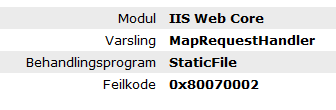
If I add this to web.config
- <location path="ImageScaler">
- <system.webServer>
- <handlers>
- <clear />
- <add name="wildcard" path="*" verb="*" type="EPiServer.Web.StaticFileHandler, EPiServer" />
- </handlers>
- </system.webServer>
- </location>
it works.
So I have to add stuff in web.config, until I can sort out why I get the error.

Comments