
Preview on dynamic content
Dynamic content was one of the new things in EPiServer 5. And is a cool function. But it lack a preview in edit mode. I guess moust editors will not be happy with only the yellow box stating that here will some dynamic content be added.
A while back I did a quick fix on this issue, and was able to display some preview text. But the main problem was that PropertyXhtmlString parses the text in StringFragments and a dynamic content span can’t have html inside the span. Why they call it PropertyXhtmlString is a mystery for me, since there are not very much xml about this property :)
Since the underline problem is the StringFraments construction in PropertyXhtmlString I needed to replace the whole property with a new one.
PropertyHtmlString
I found a nice dll for parsing html and build a new property around that.
EditMode
In edit mode I parse the text to an html node object. Then I start to manipulating the node structure. First I find all links and image resources. This was done by the StringFragments construction and they used and INTERNAL class UrlFragment. (SHAME ON YOU who every you are…..).. I had to copy the code and changed all my edit links to GetEditFormat(). Then I looped recursive down inside the node structure. When I find a dynamic content span I create html preview and add that inside the span as html.
public void EditModeFixForEdit(HtmlNode node, bool insideDynamicContent, Control container, PageBase page)
{
var dynContent = GetDynamicContentFromNode(node);
if (dynContent != null)
{
insideDynamicContent = true;
try
{
if (!dynContent.RendersWithControl)
node.InnerHtml = "<div class='previewDynamic'>" + dynContent.Render(null) + "</div>";
else
{
StringBuilder sb = new StringBuilder();
StringWriter tw = new StringWriter(sb);
HtmlTextWriter hw = new HtmlTextWriter(tw);
var ctrl = dynContent.GetControl(page);
ctrl.RenderControl(hw);
node.InnerHtml = sb.ToString();
}
}
catch (System.Exception error)
{
node.InnerHtml = "Dynamic content could not be previewed " + error.Message;
}
}
if (insideDynamicContent && node.Name.ToUpper() == "TABLE")
{
node.Name = "span";
node.Attributes.Add("style", "background-color:red");
node.InnerHtml = "Table removed from preview";
}
foreach (HtmlNode sub in node.ChildNodes)
EditModeFixForEdit(sub, insideDynamicContent, container,page);
}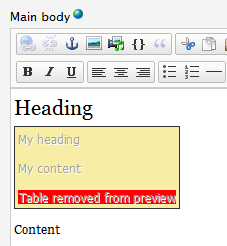 This works as a charm, except when I added a table inside the span tag. TinyMCE has a built in function to clean up html code. And apparently table cant be inside span, so it was moved outside of that. I therefore had to suppress preview of tables.
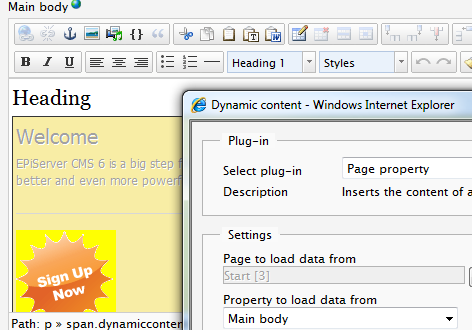
The preview will even try to display content that renders as an control. And that is pretty cool
Display mode
After the edit mode of the property worked I started on the display mode. The key here is that instead of writing static text, links and dynamic content as controls, I does it for every html control.
public void ViewMode(HtmlNode node, Control container,PageBase pageBase)
{
    if (node.Name == "#text")
        container.Controls.Add(new Literal() { Text = node.InnerHtml });
    else
    {
        var dynContent = GetDynamicContentFromNode(node);
        if (dynContent != null)
        {
            if (dynContent.RendersWithControl)
                container.Controls.Add(dynContent.GetControl(pageBase));
            else
                container.Controls.Add( new Literal() { Text = dynContent.Render(pageBase) });
        }
        else
        {
            HtmlGenericControl generic = new HtmlGenericControl();
            generic.TagName = node.Name;
            foreach (var att in node.Attributes)
            {
                if (att.Name == "href" || att.Name=="src")
                {
                    UrlFragment frag = new UrlFragment(att.Value);
                    generic.Attributes.Add(att.Name, frag.GetViewFormat());

                }
                else
                {
                    generic.Attributes.Add(att.Name, att.Value);
                }
            }
            container.Controls.Add(generic);

            foreach (var sub in node.ChildNodes)
                ViewMode(sub, generic, pageBase);
        }
    }
}
I therefore has a fully control structure on the page of the html content. That means that it’s fairly easy to add functionality like form content. And also easy to work with the page in PreRender to change content, find all links, headings etc.
IReferenceMap
Then the last part of the PropertyHtmlString has to be solved. the IReferenceMap. Since I can use XPath’s on the html its fairly easy to find all links and dynamic contents.
public IList<Guid> ReferencedPermanentLinkIds
{
    get
    {
        List<Guid> list = new List<Guid>();
        foreach (var item in GetLinks(HtmlNode))
            foreach (var sub in item.Value)
            {
                UrlFragment frag = new UrlFragment(sub.Attributes[item.Key].Value);
                list.AddRange(frag.ReferencedPermanentLinkIds);
            }
        foreach (var item in GetDynamicContent(HtmlNode))
        {
            if (item.Value is IReferenceMap)
                list.AddRange((item.Value as IReferenceMap).ReferencedPermanentLinkIds);
        }
        return list;

    }
}

public void RemapPermanentLinkReferences(IDictionary<Guid, Guid> idMap)
{
    foreach (var item in GetLinks(HtmlNode))
        foreach (var sub in item.Value)
        {
            UrlFragment frag = new UrlFragment(sub.Attributes[item.Key].Value);
            frag.RemapPermanentLinkReferences(idMap);
            sub.Attributes["href"].Value = frag.GetEditFormat();
        }
    foreach (var item in GetDynamicContent(HtmlNode))
    {
        if (item.Value is IReferenceMap)
        {
            (item.Value as IReferenceMap).RemapPermanentLinkReferences(idMap);
            item.Key.Attributes["state"].Value = item.Value.State;
            var i = new UnicodeEncoding().GetBytes(item.Value.State);
            item.Key.Attributes["hash"].Value = SiteSecurity.GenerateStringHash(SiteSecurity.GenerateHash(i));
        }
    }
    this.Value = HtmlNode.OuterHtml;
}
Download
The files can be downloaded here
Great that we have a code section on world now!

Comments