
Itera.Objects, a extension for PageTypeBuilder
I have been looking and PageTypeBuilder, and the concept is great. But one thing I missed was the ability to add objects of all types and not only primitives or propertydata types.
I started by downloading the latest build, and looked around. The Interceptor get’s the value of a property and set’s it on the page object. I therefore had to create a property that was a wrapper around a object. Before I have used Itera.MultiProperty to store many variables. This time I tried to use the dynamic data store, but after a couple of hours trying to set a setting on a property from code I switch over to saving them as real properties on the page.
These properties are disabled from edit mode, and I have a container property that shows these hidden properties.
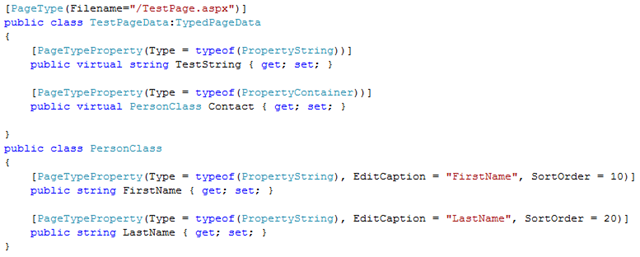
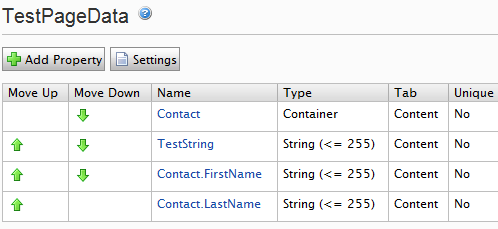
When Page type builder finds this stuff It will create a 2 properties. But since PTB doesn’t follow type’s I have made a IInitializableModule that follows these types, and adds the hidden properties.
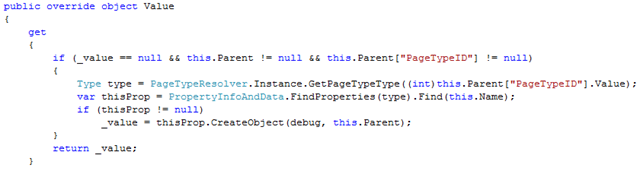
The property PropertyContainer will in a context of a strong Types page create the an instance of the object and populate all the primitives from the hidden property data. If it encounter another PropertyContainer it will create that object and populate it form it’s hidden properties.
There is actually 5 different properties, that will display a bit differently in edit mode.
- PropertyContainer
- PropertyContainerWithHelp
- PropertyContainerSmall
- PropertyContainerSmallNoBox
- PropertyContainerSmallWithHelp
If you specify different tab’s for the different properties the layout will also change.
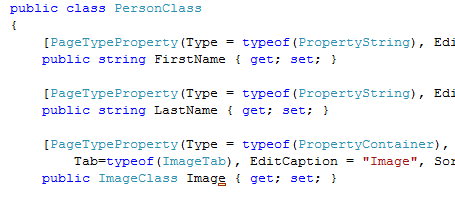
will display in edit mode like this:
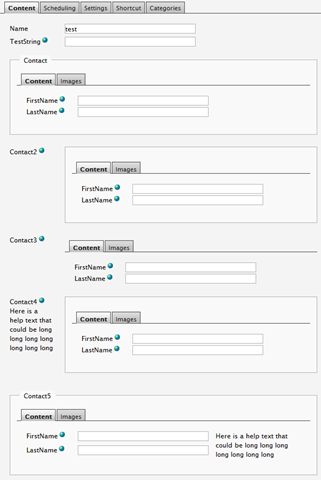
and
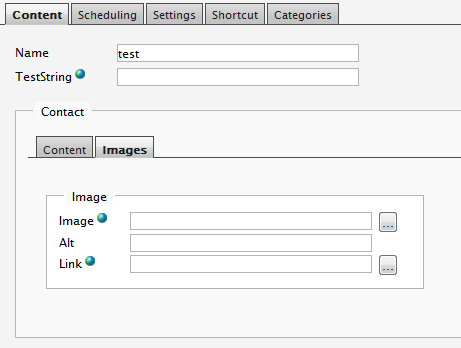
How cool is that :)
And even better, the tabs have access rights!

Comments