


QuickWatch Gadget
Here is my humble contribution to the Gadget Contest 2009. The SiteCenter in EPiServer CMS 6 is truly awesome and I think it will be a big help to many of the roles involved in a company’s web site – editors, web masters, marketing managers, sales people, managers, designers and my favorite group: developers.
So naturally I made a gadget for them. A gadget that I hope can make life a little bit easier for all the brave developers who are on the front lines in the fight for awesome functionality in tomorrows Web. (If I sound a bit too bombastic, I apologize – living in the US is affecting me in ways I don’t even dare to think about).
Nevertheless, the QuickWatch Gadget is a gadget that allows you to write c# code directly in the gadget, compile it on-the-fly, run it in the current AppDomain and context and then browse whatever object structure your code returns.
A simple example:
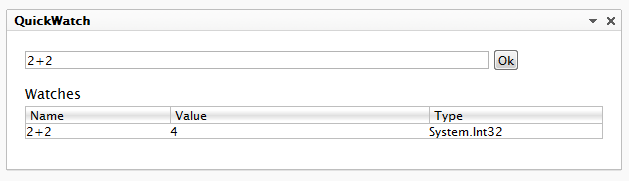
In the above example the code line we wrote is being executed, and an implicit “return” is inserted before the statement, since it isn’t already there. But of course we could expand on it:
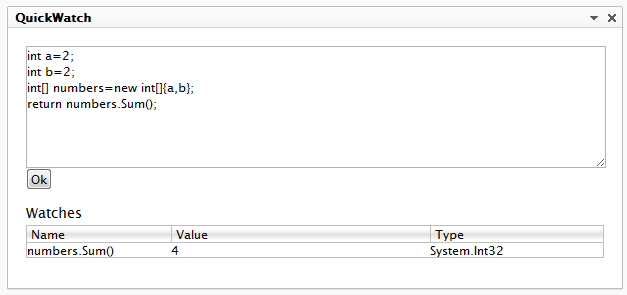
What is happening behind the scenes is that a temporary method is being created, and the code is executed inside that.
- “That’s all fine and nice – but I don’t need yet another calculator”, I hear you cry. Well, that’s where it comes in handy that it’s running in the same AppDomain and context as the current web site. You can access pretty much anything – almost like when you use the “QuickWatch” while debugging in Visual Studio.
How about this:
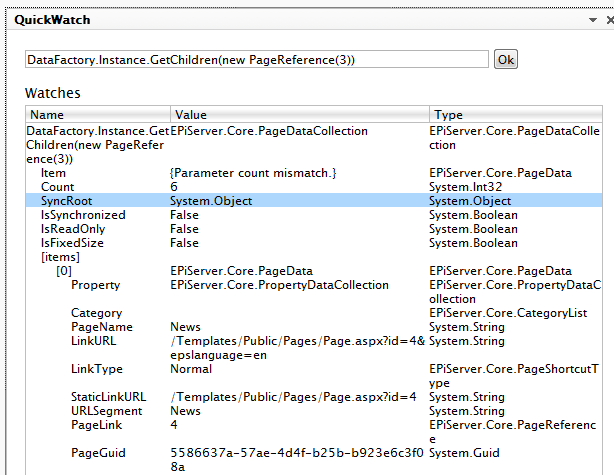
You can drill-down in the object structure, by clicking on each line. Or what about browsing through the Current Http Context? Or perhaps registering a new PageProvider dynamically? As I was developing this, I actually used it to debug it self. And once you’ve gotten hooked on dynamic code execution, there’s no turning back :-)
You can of course configure which namespaces to use, how deep to dig the object tree, and so on if the “Edit” view:
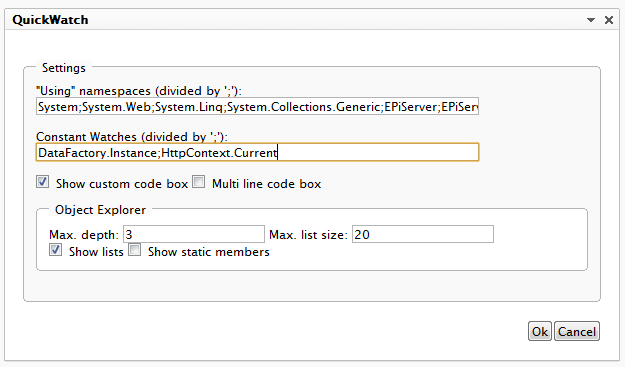
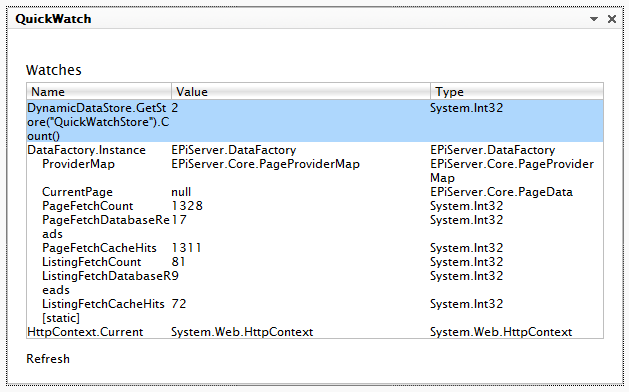
In this view you can also specify a number of values you want to constantly watch – and you can even turn off the custom code box if you only want to use the gadget to monitor certain values – like a counter for numbers of items in your data store:
“Great, I can see it’s useful – but wouldn’t this be a security problem? Somewhere, Bruce Schneier must be weeping.”
Every single line of code ever written is in my eyes a potential security problem. This shouldn’t stop us from writing code and exploring the options that lie before us. I have tried to secure the gadget as good as I could – for instance it checks to make sure only Administrators use it. But if you are working for the Pentagon, you might want to hold back deploying it to all production servers unless there is an urgent need :-) However I see no problem using it on development and test environments. It safes you the trouble of attaching a debugger :-)
Download & Installation
Inspired by Björns cool gadget I have also made a zip-module that can easily be installed using EPiServer Deployment Center on an existing CMS 6 CTP 2 instance.
Download it here.
You can also get the full source here.
Bugs and feature requests
There is a small number of known bugs – some of the related to the fact that ASP.NET likes to modify whatever content is submitted. Also, a feature I am considering adding is the ability to work with any .NET language – not just C# in it. If you have further bugs or feature requests send them to ath (at) episerver.

Comments